How to Share PDF Documents Online: A Practical Guide
Nick · Published 31 August 2026
You can send a PDF in seconds and still have no idea what happened after it left your outbox. A freelancer emails a proposal at 9pm, a founder forwards a pitch deck to a warm lead, a photographer sends wedding proofs to a couple, then all three refresh their inboxes and wait for nothing. The file arrived, but the sender is blind to whether it was opened, skimmed, forwarded, or ignored.
That's the core problem behind share PDF documents online. Teams often focus on delivery, then discover that delivery isn't the same as visibility, control, or follow-up. Once you treat a PDF as a durable asset instead of a throwaway attachment, the decision gets clearer, because you stop asking only how to send it and start asking what you need to learn from it after the send.
Table of Contents
- The Quiet Problem Behind Every Shared PDF
- The Main Ways to Share a PDF Online
- Security Controls That Actually Earn Their Place
- Viewer Modes and the Reader Experience
- Analytics, Privacy and Why They Belong Together
- Durable Links Versus Disposable Attachments
- How EveryPage, DocSend and PandaDoc Compare
- Picking the Right Method for Your Situation
The Quiet Problem Behind Every Shared PDF
At 9 p.m., a proposal leaves the outbox and the conversation goes quiet. By morning, the sender still cannot tell whether the recipient opened it, skimmed the pricing page, or passed it to a colleague.
A shared PDF can travel far beyond its first inbox. A pitch deck may be discussed internally before the founder receives a reply. Wedding proofs may be viewed on a phone, then buried in an email thread. Delivery happened, but the document's next steps remain invisible.
That silence has practical causes. Email attachments provide little feedback once a file is downloaded, forwarded, or stored elsewhere. A delayed response could reflect timing, confusion, or disinterest, and the sender has no reliable way to separate them.
The value of a shared PDF is knowing what happened after it left your hands.
Evaluate sharing methods by the decision they need to support. Basic delivery suits a document that only needs to arrive. A trackable link suits a proposal, deck, or client file where follow-up depends on reader behaviour.
Page-level engagement, repeat visits, and viewing patterns can show which pages received attention and whether the document deserves revision. That information turns a PDF into a durable, trackable asset rather than a disposable attachment. Choose IP-free analytics when you need useful engagement signals without collecting personally identifying reader data.
The Main Ways to Share a PDF Online
A proposal needs follow-up, a brochure needs reach, and a client file needs controlled access. The best way to share each PDF depends on the job, the reader's setting, and how much useful feedback you need after delivery.
What each method does
Email attachments remain the quickest option. Attach the file, press send, and the PDF lands in an inbox or downloads folder. Recipients already understand the process, but the sender gets little visibility once the file leaves the message.
Cloud storage links keep one copy of the PDF in a shared location. A recipient can open it in a browser or app, and the link is easier to replace or reuse than an attachment. View counts may be available, although they rarely show how thoroughly someone read the document.
Dedicated document sharing platforms put the PDF in a browser-based viewer and can add access controls, engagement data, and tracking. Page-by-page behaviour, time on page, and repeat visits help when the document supports a sales, compliance, or client workflow. The trade-off is setup and, in some cases, a more structured recipient experience.
Embed codes place the PDF inside a web page. A landing page, product page, or resource centre can provide context around the document while keeping the reader on your site.
QR codes connect a physical item to the online document flow. A brochure at an event, a studio sign, or a handout in a meeting room can send someone to the PDF without requiring them to type a URL.
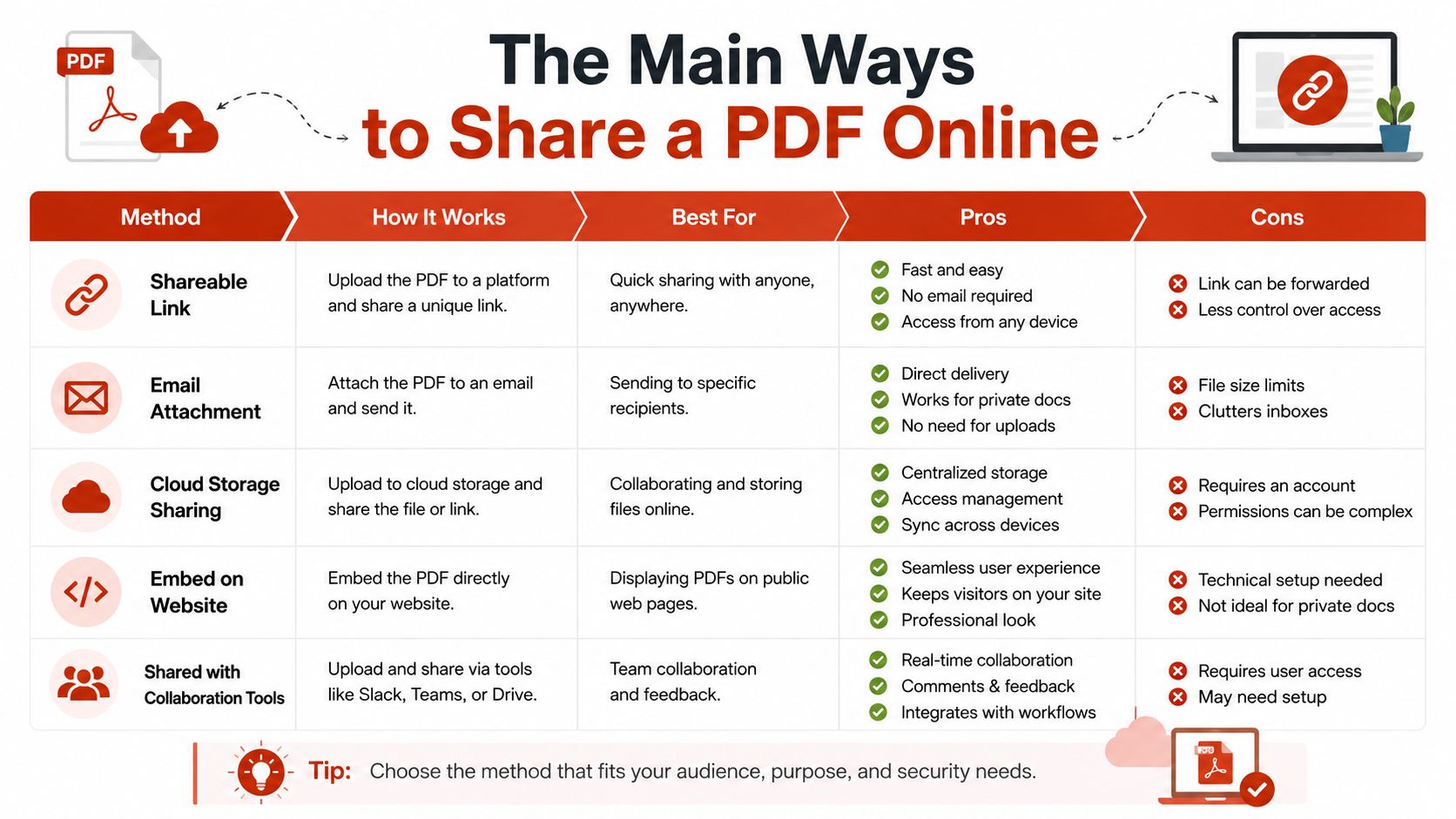
The signal you get back changes the job
Email confirms little beyond sending. A cloud link may show that the file was viewed, while a dedicated platform can provide a fuller picture, particularly when access is identified or gated. That difference matters when a PDF is a durable, trackable asset rather than a disposable attachment.
Choose the method according to the decision you need to support. An attachment suits a one-off handoff. A browser viewer with analytics fits a deck that needs follow-up, while an embed keeps a site-based brochure in context. QR codes work when the journey begins offline.
IP-free analytics add a practical privacy criterion. They can show useful engagement patterns without collecting personally identifying reader data, which makes them suitable when you need follow-up signals but want to limit data collection.
Security Controls That Actually Earn Their Place
Security controls are easiest to misuse when they're treated as decoration. Passwords, expiry dates, watermarking, domain allowlists, and revocation all make sense in some situations, and all of them add friction if you apply them without a reason. The right question is not whether a control exists, it's whether the document risk justifies it.
Use controls that match the document
A salary band shared with candidates is a different problem from a public brochure. A board deck sent to investors is different again. A contract routed for signature needs more structure than a draft pricing sheet being reviewed internally.
Passwords help when a recipient group is small and known, but they're clumsy if you need broad circulation. Expiry dates matter for time-bound offers or limited review windows, because the document should stop travelling once the decision passes. Watermarking earns its place when a file is sensitive enough that you want a visible reminder of ownership or provenance on every page.
Domain allowlists are useful for internal or partner-only material, because they restrict where the document can be opened. Revocation matters when someone changes role, leaves a company, or should no longer have access to a live version of the file. For practical guidance on protecting a file before you share it, see how to send a PDF securely.
Practical rule: add the lightest control that still protects the document from the actual risk you're facing.
Match the control to the workflow
If a freelance designer is sending proofs, watermarking and view-only access are often enough. If a legal team is sharing draft contracts, expiry and access restrictions matter more. If a sales rep is sending a proposal, a password may help, but revocation and a permanent URL can be more useful if the deck keeps changing.
Security should reduce exposure without breaking the reader experience. When it becomes heavy-handed, people start copying the file into email threads, screenshots, or uncontrolled exports, which defeats the point.
Viewer Modes and the Reader Experience
The viewer is not a cosmetic choice. It shapes how a person feels about the document and how they move through it. A PDF can feel like a polished artefact, a web page, or a raw file depending on how you present it, and that changes behaviour more than expected.
Choose the viewer for the outcome
Inline browser preview keeps the reader in flow. That works well when the PDF sits inside a sales page, onboarding flow, or client portal, because the document feels part of the same experience. It's useful for proposals, portfolios, and brochures, but it does soften the sense that the file is a final, portable object.
Forced download gives the reader the file immediately. That suits contracts, datasheets, and lead magnets, especially when the recipient wants to keep a copy. It also removes most chance of measuring engagement before the file leaves the browser, so you lose some behavioural signal.
Side-by-side presentation works well when the reader should see the document and the next action together. A proposal page with a contact form or pricing block beside the PDF gives the reader one clear path forward. That setup often suits commercial content better than a bare attachment ever could.
Small toggles change behaviour
Print blocking, copy blocking, and watermark-on-view can shift how people use a document without making the experience hostile. A photographer sharing proofs may want inline viewing with watermarking so clients can review in context. A legal team may prefer download-only with copy disabled because the document should be handled as a controlled working copy.
For a deeper product-level view of mode selection, see EveryPage viewer modes. The important thing is to decide intentionally. The viewer should match the document's purpose, not default to whatever the platform happened to ship first.
Analytics, Privacy and Why They Belong Together
Page-by-page time, return visits, and read-through patterns reveal which parts mattered and which were skipped. The strongest signal from a shared PDF is how the document was read, not merely whether it opened. That insight becomes useful when the sharing setup preserves enough structure to connect activity to the right recipient or session.
More signal usually means more responsibility
Anonymous links can show surface activity, but they rarely explain who engaged or how thoroughly they read. Named access provides better insight, while creating privacy obligations. Once reader-level data enters the system, retention, deletion, access controls, and data necessity all require a clear policy.
Analytics and privacy belong in the same decision. A page-level heatmap may look useful, but invasive tracking shifts the burden to compliance and reader trust. A lighter approach can keep analytics first-party to the viewer and avoid storing identity data that the team does not need.
If you want read-depth, collect only what helps you act on the document. Everything else becomes overhead.
Use the least intrusive tier that still answers the question
A simple view count confirms that the file opened. Page-level analytics show what was read, how long readers stayed, and whether they returned. A per-reader record supports follow-up, proof of delivery, or compliance evidence, but it also demands stronger controls for handling recipient-linked information.
| Tier | Signal Provided | Data Captured | Compliance Load |
|---|---|---|---|
| Basic link view | Open count or coarse activity | Minimal session data | Lower |
| Page-level analytics | Page views, time on page, revisits | Reader session metadata | Moderate |
| Reader-level tracking | Named opens, read patterns, follow-up cues | Recipient-linked engagement data | Higher |
For sales, investor, and compliance PDFs, the choice affects more than reporting. A team deciding how to share a document is also deciding how much reader information to retain, how long to keep it, and whether that information supports a real action.
That makes privacy an operating constraint rather than a final review step. If the goal is to identify a page that needs revision, page-level activity may be enough. If the goal is to prove delivery or guide a specific follow-up, reader-level tracking may justify the added responsibility.
Durable Links Versus Disposable Attachments
An attachment preserves a moment. A durable link preserves the working version. That distinction matters when a PDF continues circulating after the original email disappears.
One URL beats repeated resends
A durable link gives the team one canonical copy to maintain. Update the source in place, and recipients continue using the same URL. There is no follow-up email asking everyone to find “the latest version,” and fewer outdated files remain in inboxes and shared folders.
Version control becomes tangible when deadlines are tight. A sales rep once sent a proposal with an old pricing page, then discovered the mistake after several prospects had forwarded the PDF internally. Replacing the file behind the existing link corrected the document before the next review, while an attachment would have required identifying every recipient and retracting every copy.
That approach also reduces operational cleanup. A typo in a proposal can be fixed without resending the full file. An outdated clause in a draft can be replaced before signatures happen. A republished brochure can stay current without asking each contact to discard an old attachment.
A link does not solve every sharing problem. Anyone who downloaded an attachment still has a copy, and a link that allows unrestricted downloading can create the same version-control risk. Set access rules according to whether readers need a stable reference, a downloadable record, or both.
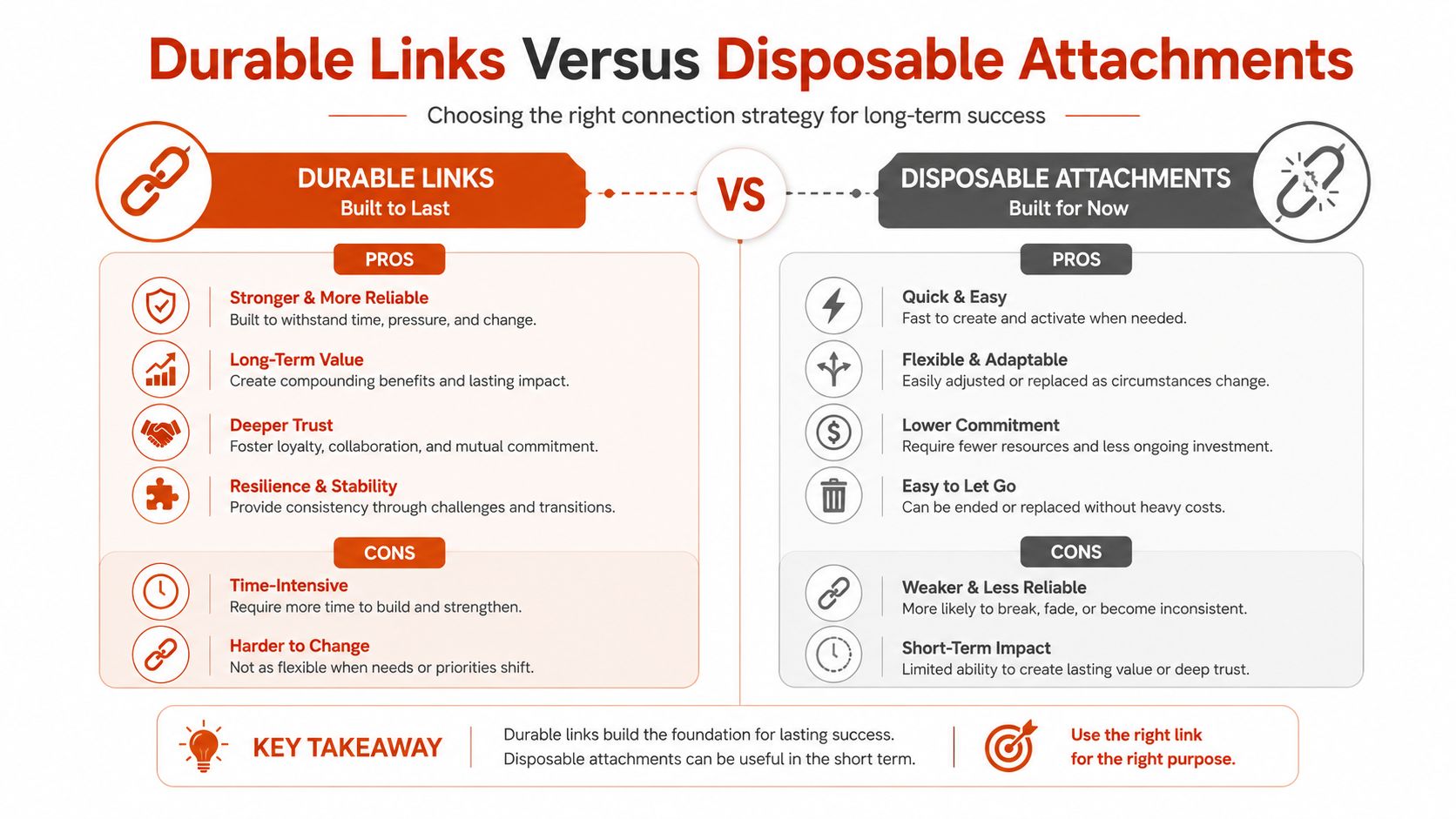
When attachments still make sense
Sometimes the exact bytes sent are the record. Legal filings, signed agreements, and audit artefacts often belong in that category. A disposable attachment suits those cases because preserving the historical document matters more than updating it later.
For commercial PDFs that will be revised, referenced, or shared internally, a durable link usually creates less version confusion. Choose the attachment when immutability is the requirement. Choose the link when controlled updates are the priority.
How EveryPage, DocSend and PandaDoc Compare
Different tools solve different parts of the problem. DocSend is built around secure sharing and page-level tracking, including who opened a deck, which page they lingered on, and forwarding behaviour, which makes it a strong fit for sales teams living in CRM-style workflows as compared by Tomba. PandaDoc leans into document creation and e-signatures, which suits contract execution better than pure share-and-track use cases. EveryPage is built around browser-based PDF sharing with page-by-page analytics and IP-free reader tracking, so the document stays a durable asset instead of a disposable transfer.
Side by side for practical buyers
| Platform | Entry Price | Link Permanence | Watermarking | Analytics Depth | Best For |
|---|---|---|---|---|---|
| EveryPage | Free, Basic $9/month, Pro $29/month | Permanent links are supported, expiry is optional | Yes | Page-by-page analytics, read-through funnel, re-read rate | Marketing collateral, portfolios, evergreen pitch decks |
| DocSend | Starts at $10 per user per month on Personal, $45 per user per month on Standard DocSend pricing | Strong sharing controls | Available in secure sharing workflows | Secure sharing with page-level tracking and forwarding insight | Enterprise compliance teams and sales organisations |
| PandaDoc | Seat-based pricing with per-document charges on some plans PandaDoc pricing | Built around document workflows | Depends on workflow | More centred on document creation and signatures | E-signatures and contract workflows |
EveryPage's limitation is straightforward. It has a smaller integration ecosystem than large sales-suite tools, and it's less suited to high-volume enterprise sales motions that live deep inside CRM automation. If you need native CRM sync as the centre of the workflow, a dedicated sales platform may fit better.
Where each tool fits honestly
A solo founder who wants a permanent link, page-level analytics, and no reader account can use EveryPage without adding a heavy stack. An account executive who wants deeper enterprise sales workflow integration may prefer DocSend. A contracts team that needs signature-heavy document handling will usually get more from PandaDoc.
For a direct product comparison, see DocSend vs EveryPage vs PandaDoc. The right choice depends on whether the document is mainly for sharing, signing, or workflow automation.
Picking the Right Method for Your Situation
A photographer sending proofs usually needs a permanent link, view-only access, and watermarking so clients can review without confusion. A founder pitching investors needs to know which pages were read and whether people came back to the deck. A legal team sharing contracts needs expiry, domain restrictions, and signature support. A marketer embedding a whitepaper on a landing page needs a clean in-page viewer and a way to track downloads or engagement. A consultant sending a one-off proposal can often get away with a plain email attachment.
A quick decision checklist
- Goal: Are you trying to deliver, persuade, collect a signature, or measure reading?
- Audience size: Is this for one person, a small group, or a broad public page?
- Security need: Does the file need passwords, watermarking, revocation, or domain restrictions?
- Analytics value: Do you need a simple open signal or page-by-page reader behaviour?
- Link permanence: Should the file live as one stable URL, or should the exact sent copy stay fixed?
If you need simple delivery, an attachment or basic link may be enough. If you need proof of reading, revocable access, or document updates without re-sending, a browser-based sharing platform is the better fit. If you need signatures, pick the tool built for signatures instead of forcing a share-and-track product to behave like a contract system.
If you want share PDF documents online with permanent links, page-level analytics, and no reader accounts, EveryPage gives you that workflow in a browser-based viewer. It's built for durable documents that you can update in place, control with optional access settings, and share immediately from a single account. Visit EveryPage to see how that fits your PDFs.
See who reads your next PDF.
Try EveryPage free