Interactive PDF Viewer: A Practical Explainer
Nick · Published 29 August 2026
You've sent a polished PDF, but you can't tell what happened after the attachment left your outbox. Did the investor open the traction slide, did the client study the pricing page, or did the reader download the file and disappear? An interactive PDF viewer answers those questions by combining browser-based document rendering with page-level interactions and an event stream that records how readers move through the document.
The important distinction is that interactivity and analytics aren't separate features. A hotspot, page jump, form field, comment, or video creates a specific event at a known location. That gives the viewer something more useful to measure than a single download. It can show which page was entered, how long it remained visible, whether the reader returned, and which action followed.
Table of Contents
- An Interactive PDF Viewer in Practice
- What an Interactive PDF Viewer Is
- Interactions the Viewer Supports
- How Interactive Viewers Are Built and Run
- How Reader Analytics Are Captured
- Real Workflows the Same Viewer Powers
- Choosing an Interactive PDF Viewer That Fits
An Interactive PDF Viewer in Practice
A founder emails a pitch deck to an investor in the morning. Later that afternoon, the founder opens a dashboard and sees that the deck was viewed, the traction slide held attention, and two readers moved straight to the appendix. The dashboard doesn't know the investor's private browsing history. It knows what happened inside the shared document.
That moment depends on several connected parts:
- The PDF renderer draws text, vector graphics, images, page boundaries, fonts, and other document content in the browser.
- The interaction layer places clickable regions, links, page jumps, media controls, forms, comments, and other objects over the rendered page.
- The container application provides the share link, viewer interface, access controls, storage, and integrations.
- The analytics stream records page entry, page exit, dwell time, rereads, and deliberate interactions such as link clicks or form submissions.
A plain attachment usually gives the sender one weak signal, a file was downloaded or perhaps opened. A browser viewer can keep the reader in a controlled environment, where each page transition becomes a meaningful event. That doesn't prove intent, and it doesn't tell you why someone paused on a page, but it gives you a more useful reading timeline.
Practical rule: Treat the document as a durable, trackable asset. Expiry or self-destructing access can be useful controls, but they should be choices made by the sender, not assumptions built into the sharing model.
EveryPage is our product, and it follows this browser-first pattern. Anyone can upload a PDF and receive a tracked link immediately, without creating an account. Readers don't need an account or an app either. The document can use a permanent link that's updated in place, or the sender can choose controls such as password protection, watermarking, or optional expiry.
The rest of the system becomes easier to understand once you separate the page renderer from the objects placed above it. The renderer makes the page readable. The interaction layer makes it actionable. The analytics stream records what readers do with both.
What an Interactive PDF Viewer Is
A sales proposal arrives as a browser link. The reader opens a page, selects a product image, jumps to a pricing section, and completes a field without downloading the file. That experience comes from an interactive PDF viewer, software that renders PDF pages and turns the file's supported objects into usable controls.
The viewer reads the document's page content, then coordinates links, fields, annotations, media, and navigation with the application around it. This distinction matters for measurement: page-level objects create deliberate interaction events, while page entry, exit, and time spent provide context for those actions. Privacy-respecting analytics can show how a document is used without claiming to know a reader's identity or intent.
The technical foundation is the separation between page content and annotations. Annotations include markup such as highlights, comments, and stamps, along with non-markup objects used for forms and multimedia. They sit above the underlying text and graphics instead of rewriting the page itself, as explained in this technical guide to PDF annotations. A viewer can therefore place a clickable region or comment over a page while preserving the designer's pagination and text stream.
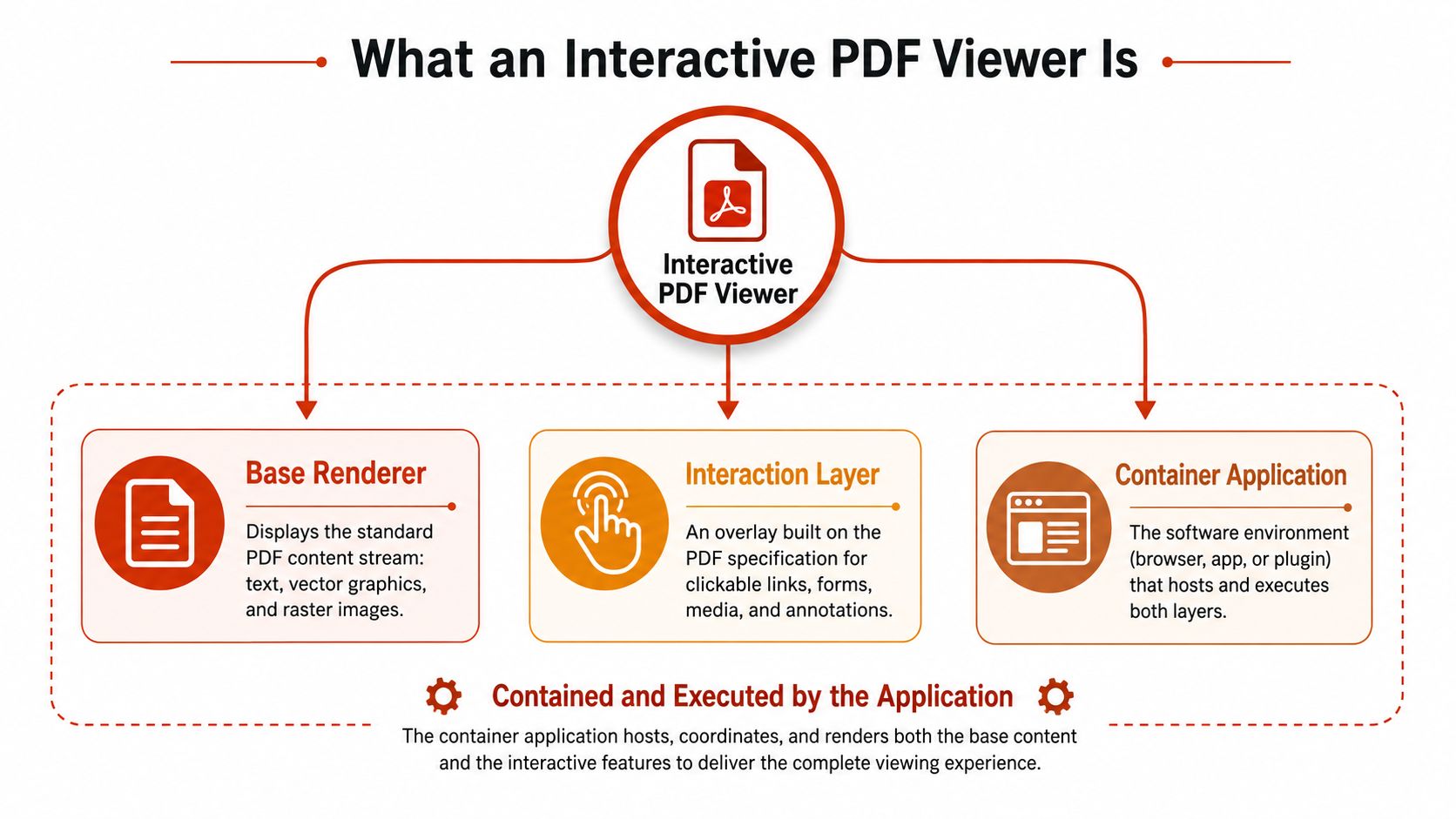
The three layers
The base renderer displays the standard PDF content stream. It handles text, vector shapes, raster images, and each page's visual arrangement. In a browser, that content may appear on a canvas, in a text layer, or through another browser-compatible mechanism.
The interaction layer maps coordinates and events to objects placed over the page. A transparent hotspot can cover a product image. A form field can align with a printed line. A comment can attach to a precise location without changing the words beneath it.
The container application surrounds both layers. It may be an embedded viewer inside a SaaS product, an iframe on a website, a native application, or a hosted share-and-track service. It controls delivery, visible tools, access settings, and whether events enter an analytics system.
A browser's built-in PDF handler may render a file and support standard controls. A dedicated viewer adds application behaviour such as customised navigation, embedded workflows, analytics hooks, and presentation modes. The term can describe a developer component inside an existing product or a hosted tool that provides a complete viewing experience.
The history of PDF helps explain the format's interactive capabilities. PDF 1.2, introduced in 1996, added fill-in forms, radio buttons, checkboxes, mouse events, and web-importable or exportable form data. Adobe released PDF 1.7 to ISO in 2008, creating ISO 32000-1:2008. PDF 2.0 remains relatively new and is not yet widely adopted, according to this PDF format overview. Compatibility still varies because viewers do not support every part of the specification.
Interactions the Viewer Supports
The page you see is usually the visual base. The useful behaviour sits in objects positioned over it. A hotspot might be invisible until a reader clicks a product image. A page jump can take the reader from a summary to an appendix. A form field can collect an answer without forcing the reader into a separate application.
| Interaction | PDF construct | Typical use |
|---|---|---|
| Hotspot or link | Link annotation | Open a website, send an email, or activate an in-page action |
| Page jump | Destination or link annotation | Move from a contents page to a section |
| Form field | Widget annotation | Collect text, checkbox, radio, or signature input |
| Comment | Markup annotation | Attach feedback to a page coordinate |
| Video or audio | Multimedia annotation or related embedded object | Play media beside the relevant page content |
| Highlight or stamp | Markup annotation | Review, approve, or mark up a document |
The key engineering detail is that these objects generally sit above the content stream. A designer can create a rate card page, then place a hotspot over a package description that opens a pricing calculator. The page's text, artwork, and pagination stay intact while the viewer handles the click. EveryPage documents this approach through its interactive hotspot documentation, including links, media, and page-level actions.
Where interactions become useful
A founder might place a hotspot over a chart to open a supporting explanation. A training team could use page jumps to turn a long manual into a guided route. A client portal might use form fields for acknowledgements, while a review team uses comments anchored to exact locations.
Readers can also interact through presentation modes rather than annotations alone. A standard paged view may suit a report, a flipbook may suit a brochure, a swipe layout may work better on a mobile screen, and a magazine spread may support a visual portfolio. These modes change how the viewer presents pages, but they still rely on the same underlying document and event model.
Forms need particular care. Some viewers render basic fields correctly but handle appearance states, validation, saving, or export inconsistently. Browser engines can also disagree about advanced forms, and a field that works in a desktop application may not behave the same way in a lightweight browser implementation.
Media has similar rough edges. Audio and video support can depend on the viewer engine, browser policy, codec, file packaging, and whether autoplay is permitted. A muted video may start more reliably than one with sound, but senders should still test the exact file in the browsers and devices their readers use.
Accessibility is an even bigger concern. A hotspot that looks obvious to a mouse user may be invisible to keyboard navigation or lack a useful screen-reader label. The PDF Accessibility Index reports that nearly 95% of PDFs are inaccessible, which makes tagged structure, reading order, alternative text, focus states, and labelled controls practical buying criteria rather than optional polish.
How Interactive Viewers Are Built and Run
Teams usually choose between building the viewer, licensing a component, or using a hosted service. Each path moves responsibility rather than removing it.
| Dimension | Open source library | Commercial SDK | Hosted platform |
|---|---|---|---|
| Rendering control | High, engineers own the integration | High, with vendor APIs | Limited to supported configuration |
| Engineering effort | Team manages rendering, annotations, mobile behaviour, and updates | Vendor supplies components and support | Provider runs rendering, delivery, storage, and viewer updates |
| Branding | Fully customisable | Usually customisable | Depends on plan and platform |
| Analytics | Must be designed and instrumented | Usually available through APIs or events | Often built into the service |
| Accessibility | Team must test and maintain it | Shared between vendor and integrator | Provider handles the viewer, sender still owns document content and usage |
| Commercial trade-off | No SDK licence, but substantial maintenance | Licence fees and vendor dependency | Subscription, usage, or feature dependency |
An open source library such as PDF.js gives an engineering team a foundation and considerable control. It doesn't automatically solve text-layer positioning, mobile layout, annotation rendering, print fallback, keyboard support, or analytics semantics. The team still needs to decide what counts as a page view, how to prevent duplicate events, and how to test large image-heavy files.
A commercial SDK packages more of that work. It may provide JavaScript and native bindings, pre-built controls, support, and a defined API for forms or annotations. The trade-off is licensing cost and dependence on the vendor's release cycle. When the PDF specification evolves, a team may still wait for the SDK to support a feature or fix a compatibility issue.
A hosted platform removes the heaviest infrastructure work. The sender uploads a document, the provider handles storage and delivery, and the application serves a viewer URL or embed. That convenience comes with dependence on uptime, platform controls, branding rules, and the provider's integration model. An iframe is quick to deploy, while an inline component or custom integration gives the host application more control over layout and events.
The correct comparison isn't “free versus paid”. It's “which team owns rendering, accessibility, delivery, security, and measurement when something breaks?”
How Reader Analytics Are Captured
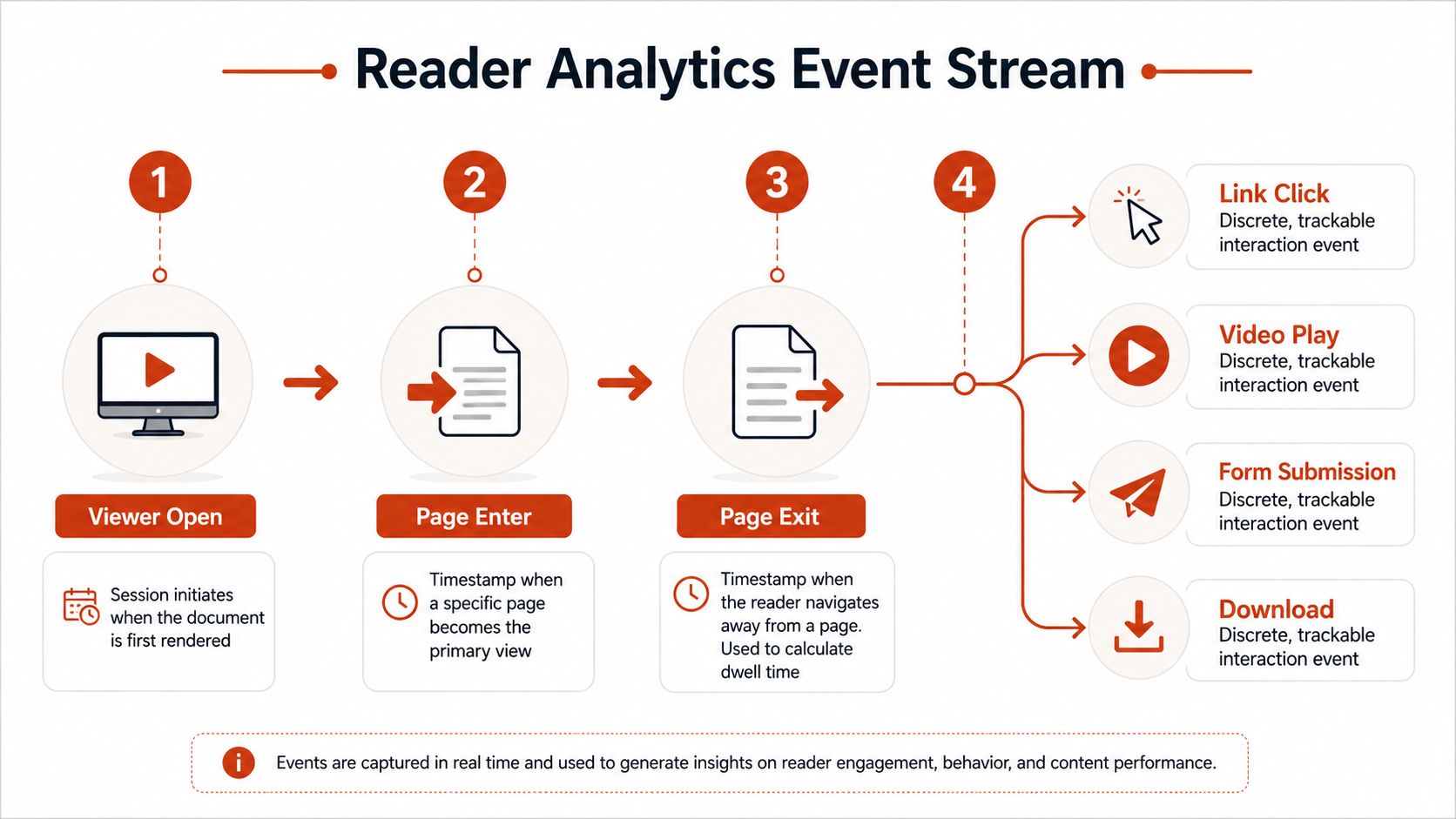
A useful viewer treats reading as an event stream rather than a single open count. The stream begins when the viewer renders the document, then records page entry, page exit, time on page, link clicks, media plays, form submissions, comments, and downloads where those actions are enabled.
Page-level measurement works because the viewer knows which page is currently primary. If a reader enters a page and later leaves it, the system can estimate dwell time from those timestamps. A read-through funnel can show how far readers progress, while reread data can identify pages that attract return visits. These signals describe behaviour inside the document, not a reader's activity elsewhere on the web. The available measures are described in EveryPage's readership documentation.
Two identity models
An IP-tracking model logs the requester's address and associates it with a session. That can help a service deduplicate activity across sessions or approximate location, but it creates a personal-data responsibility and can be misleading in shared networks, offices, mobile connections, and privacy tools.
A privacy-first model can use a pseudonymous identifier associated with a share link or reader session, then collect behavioural events without retaining the IP address. This can answer questions such as which pages receive attention and whether a reader returned, but it can't identify a person unless the sender adds an identifier through a separate action, such as a lead form or known recipient link.
EveryPage uses page-level analytics without storing reader IP addresses. Its design is intended to be GDPR-friendly, and readers don't need an account. The sender can use an email gate or a custom multi-field form when a named lead matters, while un-gated sharing keeps access simple and avoids asking every reader to register.
What the data doesn't prove
A long dwell time may mean careful reading, a paused browser tab, or a conversation happening away from the screen. A skipped page may indicate confidence, prior knowledge, or a rendering problem. Analytics should guide a follow-up question, not replace one.
Public discussion has also moved faster than independent evidence about outcomes. Coverage of browser viewers now discusses annotations and split-view support, but evidence that in-browser interaction improves rereading, retention, productivity, or decisions remains limited, as noted in this reporting on native browser PDF features. Privacy-respecting analytics are valuable partly because they narrow the data to what the document needs to record.
Real Workflows the Same Viewer Powers
A founder sends a pitch deck to prospective investors. The deck includes a clear route from the market problem to traction and financial detail. Page-level views and rereads help the founder decide which conversations deserve a targeted follow-up, without assuming that a pause on a slide equals investment intent.
A freelancer sends a proposal to a prospect. The recipient returns to the pricing page but spends little time on the scope section. That pattern gives the freelancer a useful reason to ask whether the package structure is clear, rather than sending another generic “just checking in” message.
A photographer shares wedding proofs through the same kind of browser viewer. The couple can comment on individual images, mark favourites, and explain requested changes next to the relevant frame. The photographer can then assemble the final album from feedback attached to the work itself, instead of reconciling a long email thread.
The rendering engine doesn't need to change between these jobs. The document, controls, and permissions do change. A pitch deck may use password protection and a lead form. A proposal may use a dynamic link that can be updated in place. Proofing may need comments and photo selections more than download controls.
Explore these practical EveryPage use cases to see how the same viewer model maps to sales documents, client work, investor material, and creative proofing.
Choosing an Interactive PDF Viewer That Fits
Begin with functional fit. Check annotation types, form behaviour, mobile rendering, keyboard navigation, screen-reader labels, and hotspot focus states. Test the actual documents you send, not a clean sample brochure.
Then assess operational fit. Decide whether your team can maintain an open source integration, license a commercial SDK, or use a hosted platform. Test large, image-heavy files on a slow mobile connection. Complex pages can increase latency and memory pressure. One documented PDF.js rendering path took 75 seconds for a page, compared with about 10 seconds in Chrome, as reported in this technical discussion of image-heavy PDF performance.
Finally, assess responsibility fit. Identify who owns accessibility fixes, page-level analytics definitions, privacy controls, storage, and fallback downloads. Choose interaction coverage and data collection rules that match your documents and readers.
EveryPage provides browser-based PDF sharing with clickable hotspots, viewer modes, page-by-page analytics, comments, lead capture, password protection, watermarking, dynamic links, embeds, and integrations. Upload a document without an account, create a tracked link, and visit EveryPage to test an interactive PDF viewer that measures engagement without storing reader IP addresses.
See who reads your next PDF.
Try EveryPage free