Watermarking a Document: A Practical Guide for 2026
Nick · Published 20 August 2026
The most popular advice about watermarking a document is also the least useful: add a large, pale “CONFIDENTIAL” label and assume the file is protected. A watermark doesn't stop someone taking a screenshot, saving a PDF, photographing a screen, or rebuilding text with OCR. Its real value is narrower and more practical. It asserts ownership, changes reader behaviour, and can connect a leaked copy to its source.
That distinction matters whether you're a founder sending a pitch deck, a freelancer delivering a proposal, or a photographer sharing proofs with a client. The right mark depends on the risk you're addressing, the way readers will use the file, and how much privacy you're willing to trade for traceability.
Table of Contents
- Why People Watermark a Document in the First Place
- How Document Watermarking Actually Works
- Per-Viewer Dynamic Watermarks and What They Change
- Ways to Apply a Watermark in Practice
- Comparing Tools That Watermark a Document
- What Watermarks Cannot Stop Anymore
- Best Practices Before You Share the Next File
Why People Watermark a Document in the First Place
A product manager notices a draft roadmap circulating on a public forum. The document carries another company's name, but the wording, release sequence, and internal feature notes are unmistakably hers. A static logo on the cover wouldn't have stopped the leak. It would, however, have made ownership clearer and given the team a visible way to distinguish its draft from a competitor's version.
That's the central purpose of watermarking a document. It doesn't create an impenetrable barrier around the file. It adds context and accountability to an asset that people may copy, forward, republish, or misattribute.
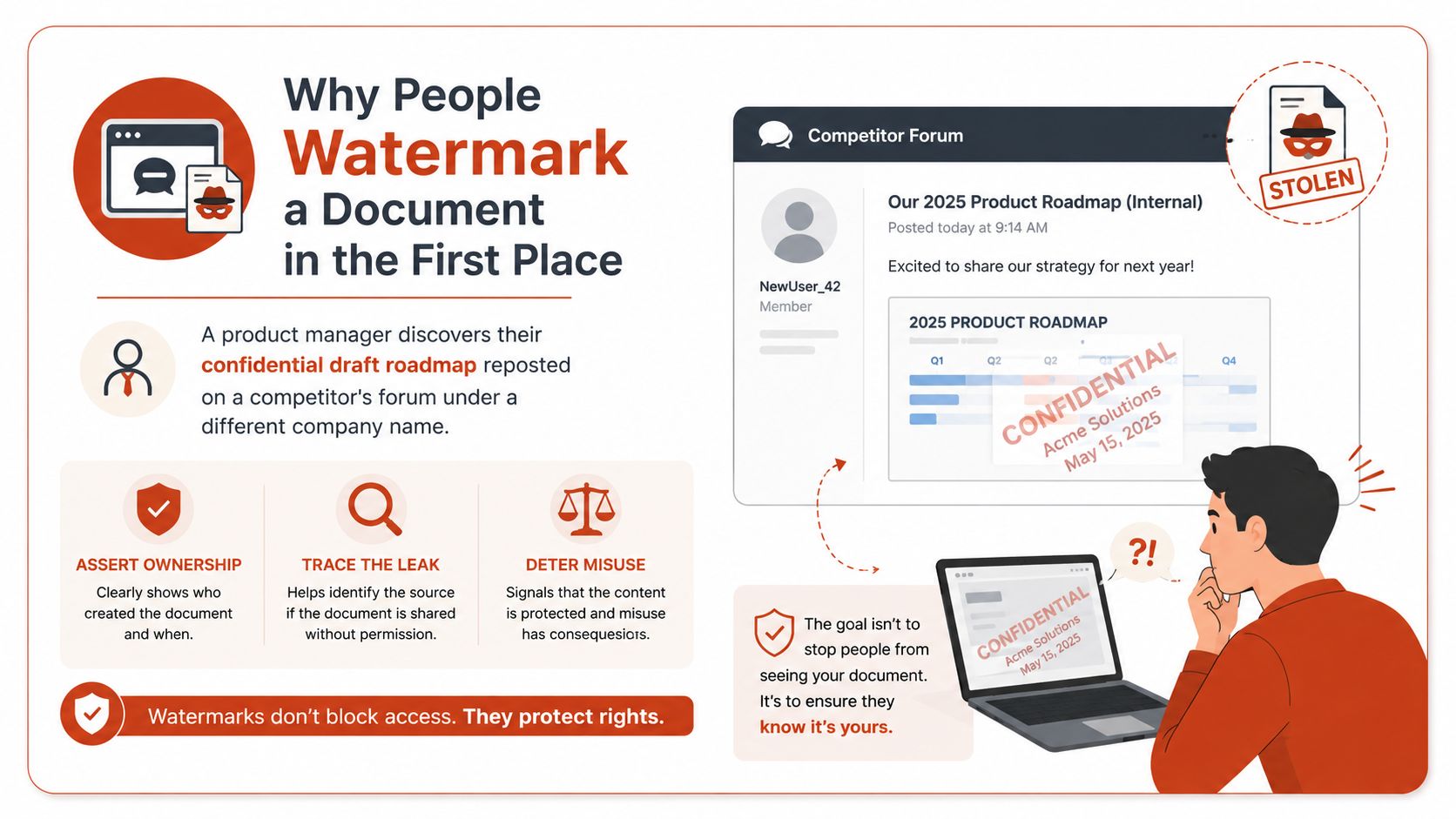
Four reasons teams adopt watermarks
Authorship. A founder sharing an early pitch deck can place the company name or copyright notice on every page. If individual slides appear elsewhere, the mark supports an ownership claim, even though it won't prove who physically copied them.
Status. A visible “DRAFT”, “INTERNAL”, or “CONFIDENTIAL” label tells readers how to handle the file. A consultant sending a proposal may want branding, while a compliance manager circulating a policy may need the status to be unmistakable.
Republishing context. A report that is later posted on a website or included in a presentation can retain a visible indication of its creator. The mark won't prevent unattributed reuse, but it makes the intended source harder to overlook.
Leak tracing. A unique recipient mark gives each shared copy a different identity. If a photographer sends proofs to several people, a per-viewer overlay can help establish which session produced a leaked version.
Practical rule: Decide whether you need deterrence, status labelling, ownership evidence, or attribution before choosing the watermark style.
People often expect a watermark to block PDF downloads, disable screenshots, or make copying impossible. Those are separate controls, and none is absolute. A password, download restriction, viewer-only link, or access log may reduce exposure, while the watermark adds a visible or recoverable trail.
The technique should therefore follow the purpose. A faint logo may suit a public brochure. A strong diagonal label may suit a draft board paper. A dynamic identity overlay may suit a controlled investor link, but it can also create a privacy issue if it displays more personal information than the reader needs to see.
Watermarking works best as one layer in a broader sharing strategy. Pair it with sensible permissions, a durable document URL, version control, and a clear plan for responding if a copy appears in the wrong place.
How Document Watermarking Actually Works
Paper watermarks began as physical patterns made during papermaking. Italian paper producers used wire shapes pressed into pulp to identify the mill or origin, turning a subtle difference in thickness into a recognisable mark. Later industrial development made watermarking more formal. A conservation history records that Frans V. E. Vaurio filed the first patented chemical watermarking process in 1959 for Customark Corporation, and notes that Customark remained the sole patent holder for chemical paper watermarking while licensing it to other mills. That history is documented in this account of chemical watermarking's commercial development.
Digital watermarking followed a similar shift from craft to engineered security. A patent record lists prior art for a watermark embedder and reader dated 1995-05-08, while patents covering digital watermarks for security documents and identification documents show filings and grants from the late 1990s and early 2000s. The Google Patents record for digital watermarking technology shows how embedding, reading, and secure-document applications became formal technical fields.
Two families organise the choices
The first family concerns visibility.
- Visible marks sit on top of the content as text, a logo, a copyright notice, or a diagonal stamp. Think of one as a yard sign. It announces ownership or status to everyone who sees it.
- Invisible marks hide information in the document's data or structure. They're closer to a forensic signature, because a specialist process may need to recover them later.
The second family concerns resilience.
- Robust marks are designed to survive ordinary transformations such as editing, reformatting, or compression. Their purpose is usually attribution or identification.
- Fragile marks are designed to react when the document changes. They resemble tamper-evident packaging. An invisible fragile mark can also work like a checksum, where an unexpected change indicates that the content may no longer match the original.
These categories can combine in different ways. A visible, strong mark is the familiar diagonal “CONFIDENTIAL” overlay. An invisible, strong mark can support later identification without changing the reader's experience. A visible fragile mark may make tampering obvious, while an invisible fragile mark can help detect edits that aren't immediately visible.
Text documents create a difficult engineering problem. Plain text has less redundancy than an image, so systems may encode information through word choice, word occurrence patterns, character counts, or layout changes rather than by altering pixels. Research on text watermarking highlights attacks such as reflow, copy and paste, paraphrasing, and format conversion, while evaluation commonly considers imperceptibility, capacity, strength, correlation, bit-error rate, SSIM, and execution time. The technical literature on text-document watermarking explains why a scheme must be tested against the transformations readers and attackers apply.
| Family | Visibility | Robustness | Typical use |
|---|---|---|---|
| Visible robust | Obvious to readers | Intended to survive normal handling | Ownership, branding, confidentiality |
| Invisible robust | Hidden from ordinary readers | Intended to survive transformations | Forensic attribution |
| Visible fragile | Obvious to readers | Changes or exposes tampering | Draft or integrity signalling |
| Invisible fragile | Hidden from ordinary readers | Sensitive to document changes | Edit detection and verification |
The file format matters too. PDF, Word, and image files expose different surfaces for embedding, while per-page rendering behaves differently from a single watermark embedded in the file structure. That choice affects both durability and what a determined attacker has to remove.
Per-Viewer Dynamic Watermarks and What They Change
A per-viewer dynamic watermark operates on a different model from a static logo. Its overlay is unique to each viewing session. When a recipient opens a controlled link, the service can render the document for that session and place identifying text across its pages, such as the viewer's name, email address, timestamp, or session identifier.
DocSend's pricing documentation shows how this approach works in practice. Its dynamic watermarking can display the viewer's email, IP address, date, and time on the document. The mark therefore acts as a live deterrent against unauthorised forwarding, rather than as a fixed label. The comparison with PDF tracking and viewer-level document delivery also raises a broader question: which information does the mark expose, and how does the service record access?
A static watermark looks the same to every reader. It can indicate that a file came from your organisation, but it generally cannot distinguish the person who opened it from the person who forwarded it. A dynamic mark gives each session a personal fingerprint, linking the displayed copy to a viewing event.
Where the extra identity helps
For an investor deck, a unique overlay may discourage a recipient from forwarding the link to an unrelated contact. In a legal or compliance workflow, it can help create a clearer evidence chain by connecting a viewed copy with a recipient and time. For a creative proof, it can make unauthorised circulation easier to investigate.
The deterrent has clear limits. A recipient can photograph the screen, retype the content, or use a language model to produce a paraphrased version without the original visual mark. The overlay can also expose private information to anyone who sees a shared screen or receives a forwarded copy.
Privacy belongs in the design decision from the start. EveryPage, our product, uses page-level reader analytics without storing reader IP addresses, and readers need no account. Its per-viewer watermarking can associate a viewed PDF with a session while keeping the analytics approach IP-free and GDPR-friendly. This differs from services whose dynamic marks display or rely on IP details. Buyers should ask which fields appear, which fields are retained, and why each one is necessary.
The regulatory context adds another consideration. The CVPR 2026 workshop paper on resilient content watermarking examines watermark removal and forgery attacks. Separately, the EU AI Act includes machine-readable marking requirements for certain AI outputs. Its transparency provisions take effect on 1 August 2026, with penalties reaching €15 million or 3% of global turnover, as summarised in the verified research material. These rules address provenance and transparency. They do not guarantee that a watermark will survive every attempt at removal.
Ways to Apply a Watermark in Practice
The implementation route should answer a threat-model question: where must the mark survive, and who needs to be identified?
For a basic internal label, Microsoft Word is often enough. Word's watermark and page-background tools can add “CONFIDENTIAL”, “DRAFT”, or a company logo with little friction. Once exported, the mark becomes part of the PDF presentation and is the same for every reader. That's useful for status and branding, but it doesn't provide per-viewer attribution.
PDF export settings in Microsoft or Google Workspace add only a thin layer over the same approach. They can produce a marked file, but they don't create a controlled viewing session. The recipient still receives a document that can be downloaded, flattened, cropped, or exported.
Match the method to the control
Acrobat Pro offers more control over text and image overlays, placement, opacity, and document policies. It's a practical choice for a team that needs repeatable PDF preparation. It still operates mainly at file level, so policy settings shouldn't be confused with server-side enforcement. A recipient who obtains the file may be able to alter its presentation or create a new copy.
Dedicated platforms take a different route. DocSend, PandaDoc, and EveryPage can attach watermarking to a hosted viewing experience rather than applying one identical mark before distribution. That supports identity-aware delivery, although it also means the document depends on the platform's viewer and the recipient's willingness to open a link rather than a clean attachment.
For source-controlled workflows, Python libraries such as ReportLab or PyPDF2 can generate marks programmatically. A legal or compliance team could create a separate marked rendition for each record, using an internal identifier and controlled data fields. This is more adaptable at scale, but it shifts responsibility for testing, access control, logging, and privacy to the team building the pipeline.
| Method | Where mark lives | Per-viewer capable | Strength | Weakness |
|---|---|---|---|---|
| Word watermark | Exported document | No, not by itself | Fast status and branding label | Same mark for every reader |
| Workspace PDF export | Exported PDF | No, not by itself | Fits existing authoring workflows | Limited enforcement after delivery |
| Acrobat Pro | PDF file and policies | Limited without hosted delivery | Detailed overlay and policy controls | Recipient may still alter or export |
| Dedicated platform | Viewer session or generated copy | Yes | Attribution and access context | Requires a hosting layer |
| Python pipeline | Generated file | Yes, with custom logic | Flexible automation | Your team owns implementation and testing |
For a practical explanation of hosted PDF controls, see this guide to PDF watermarking for shared documents. The choice is ultimately between a static badge, a policy-linked overlay, and a per-viewer trace.
Comparing Tools That Watermark a Document
There isn't a universal winner because these tools solve different workflow problems. A pitch-deck owner may value page analytics and revocable access, while a legal team may care more about signatures, encryption, or integration with an existing records system.
Best for investor decks and sales collateral
DocSend fits teams that share investor material or sales documents through controlled links and need link-level engagement context. Its dynamic watermarking can display viewer details such as email, IP address, date, and time, according to its pricing documentation. Independent pricing summaries state that recipients don't need licences merely to receive documents, while people who send documents, create links, or access analytics need their own paid account, which highlights the per-user model that buyers should budget for. One pricing analysis explains that distinction.
DocSend's limitation is that its identity-rich model can be less attractive where an organisation wants reader analytics without retaining IP addresses. It also packages watermarking as an advanced control rather than a universally available default, as noted in this separate product analysis.
Best for signatures and contract workflows
PandaDoc is the more natural fit when watermarking sits beside negotiation, approvals, and e-signatures. A contract team may prefer one system for preparing, sending, signing, and storing agreement records rather than adding a separate document viewer.
Its limitation is focus. If you mainly need page-by-page reading behaviour for a proposal, brochure, or policy PDF, a contract-centred workflow may include more machinery than the sharing problem requires. Don't select it solely because the word “watermark” appears in a feature list. Check how the marked document behaves during signing, downloading, and later retention.
Best for desktop PDF preparation and internal circulation
Acrobat Pro remains a pragmatic choice for people who need to apply a visible mark before distributing a file. Microsoft Purview Information Protection can also suit organisations already using policy-based encryption and internal information governance.
The limitation is shared responsibility. A file-level watermark travels with the file, but the author's organisation no longer controls every copy once it leaves the managed environment. These tools are strongest when the recipient is already inside an established policy boundary.
Best for privacy-conscious hosted PDF sharing
EveryPage is our product, and it combines per-viewer watermarking with browser-based PDF delivery, page-level analytics, password protection, viewer modes, lead capture, and optional access controls. Readers need no account, sharing requires no account, and anyone can upload a PDF to receive a tracked link immediately. The pricing model is flat per account, with Free, Basic at $9 per month, and Pro at $29 per month, with no per-user fees.
Its limitation is important: EveryPage is a hosted viewer rather than a replacement for every downloadable-file or enterprise contract system. A recipient can still screenshot through another app, and teams that need integrated enterprise compliance controls or e-signatures may find DocSend or PandaDoc a better fit.
Best for engineering-led bulk generation
Open-source libraries such as qpdf and python-docx suit engineering teams that need to create marked files automatically from a source system. They offer control over generation logic and can fit legal, publishing, or compliance pipelines.
Their limitation is operational rather than visual. Your team must build the identity mapping, secure storage, audit trail, error handling, and removal process. A library can place a mark on a file, but it won't decide whether the mark is lawful, readable, or appropriate for the recipient.
| Tool | Best fit | Watermark type | Notable limit |
|---|---|---|---|
| DocSend | Investor and sales sharing | Dynamic hosted watermark | Per-user access model and identity-heavy fields may not suit every privacy policy |
| PandaDoc | E-signatures and contracts | Watermarking alongside workflow controls | More contract-focused than general PDF readership |
| Acrobat Pro | Desktop PDF preparation | Static file watermark | Control weakens after the file leaves the managed environment |
| Microsoft Purview Information Protection | Policy-managed internal documents | Visible marks with policy controls | Depends on an established governance environment |
| EveryPage, our product | Hosted PDF sharing with privacy-conscious analytics | Per-viewer page and download watermarking | Requires a hosted viewer and isn't an e-signature platform |
| qpdf and python-docx | Engineering-led automation | Programmatically generated marks | Your team owns the security and audit implementation |
What Watermarks Cannot Stop Anymore
A watermark is a deterrent and attribution layer, not a complete access control. OCR can turn a screenshot of a marked PDF into clean text. A person can also photograph the screen, copy visible passages manually, or use another display and recording device that never receives the original file.
Generative AI adds another route around a visible mark. A model can ingest leaked content and produce a paraphrased draft without carrying over the original overlay. Transparency rules may require certain AI-generated outputs to carry machine-readable markings, but those rules don't technically prevent someone from extracting and rewriting the source material.
Removal tools create a similar problem. Research on text watermarking shows that reformatting, copy and paste, paraphrasing, and format conversion can damage naive schemes, while review literature warns that formatted PDF watermarks may be easy to remove. The review on semantic-preserving text watermarking is particularly relevant to legal documents because a mark that changes meaning, layout, or visual fidelity can make the document unsuitable for formal use.
The privacy cost of personalisation
Per-viewer watermarks improve attribution, but they can expose the recipient's identity to anyone who sees the copy. Displaying a name may be proportionate for a private proposal. Displaying a name, timestamp, and IP address on every page may create a larger privacy burden, especially when a link is forwarded to a group.
That's why the data fields need a purpose. If page-level engagement can work without storing IP addresses, collecting or displaying an IP address may add risk without adding equivalent value. The decision should account for GDPR obligations, retention, access to logs, and what happens when a recipient shares the document legitimately with colleagues.
A watermark can slow casual forwarding, signal that the sender takes ownership seriously, and help investigate a leak after it occurs. It won't stop a determined adversary, and it shouldn't be marketed internally as if it does. Use it alongside passwords, controlled links, download restrictions, version management, and a response plan.
Best Practices Before You Share the Next File
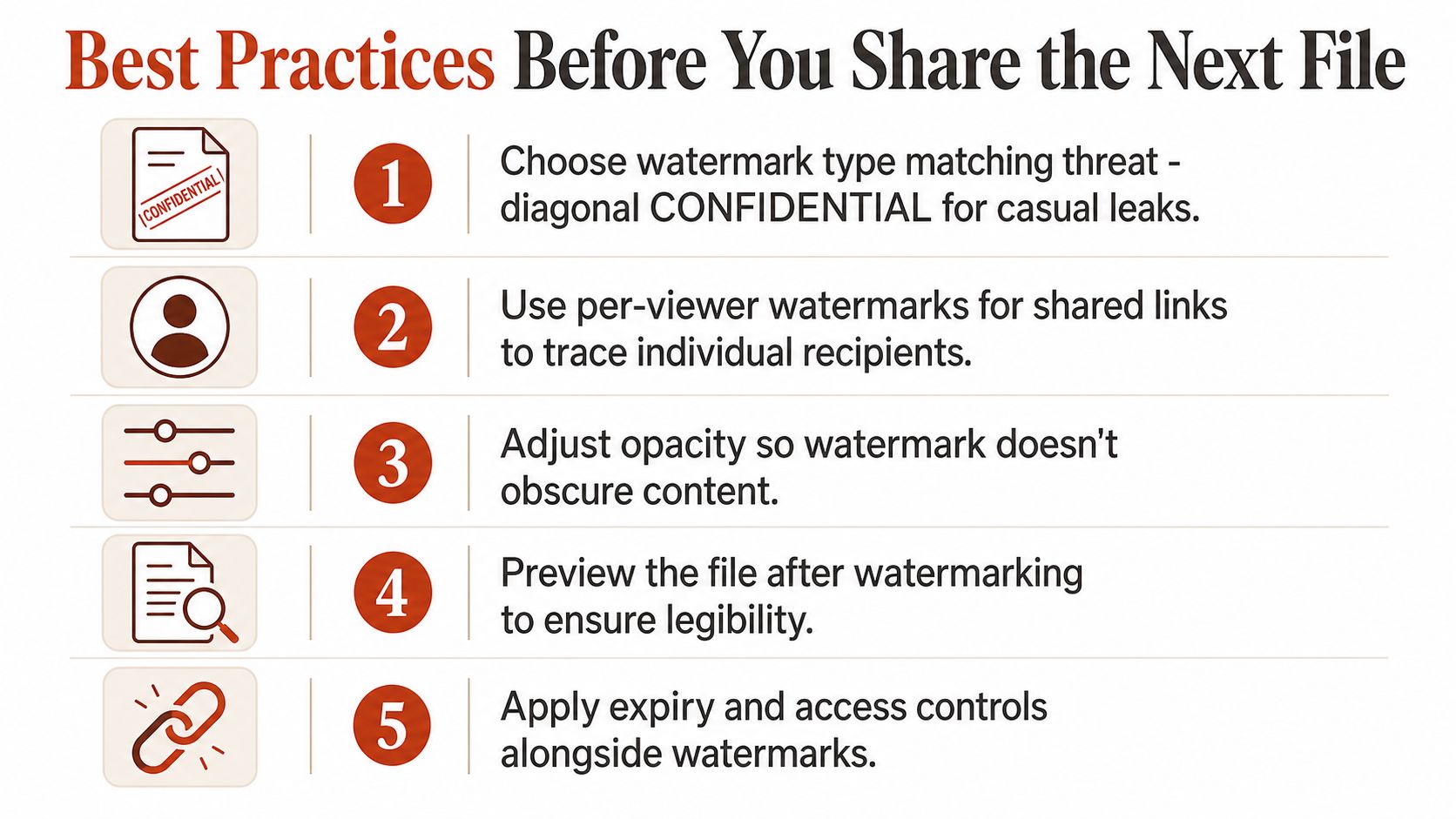
Treat watermarking as a repeatable publishing ritual. First decide what you're trying to establish. A diagonal “CONFIDENTIAL” mark suits a casual leak risk, a per-viewer overlay supports attribution for shared material, and an invisible mark may suit forensic verification. Don't collect a recipient's name, email, timestamp, or IP by default. Select only the fields the use case justifies.
Then check the reading experience. Adjust the opacity, font, rotation, and placement so the mark remains noticeable without covering a figure, signature, product image, or legal clause. A founder should read the pitch deck as an investor would. A photographer should inspect faces and detail in every proof. A freelancer should confirm that the proposal remains printable and searchable.
Use complementary controls rather than expecting the watermark to do everything:
- Choose access boundaries: Use passwords, scoped links, download restrictions, and optional expiry where they fit the risk.
- Keep the asset durable: A link can remain available and be updated in place when the document is an ongoing resource. Expiry and self-destructing links should remain sender-controlled options, not assumptions about every shared file.
- Prepare for attribution: Record who received each link and retain enough evidence to investigate a leak without retaining unnecessary personal data.
- Clean the source: Review metadata, remove superseded versions from circulation, and make sure the marked rendition is the one readers receive.
- Test the result: Open the final file on a phone and desktop, search it, print it if required, and check that the watermark hasn't made it unusable.
For a practical delivery workflow, use this guide to send a PDF securely. The best watermark is the one readers can still work with and investigators can still interpret.
EveryPage offers per-viewer watermarking, page-level reader analytics without storing IP addresses, password protection, and browser-based PDF sharing without requiring accounts for senders or readers. Upload your next document, create a tracked link, and visit EveryPage to see whether privacy-conscious attribution fits your workflow.
See who reads your next PDF.
Try EveryPage free