How to Send a Secure Document via Email
Nick · Published 5 August 2026
You're about to send a proposal, a pitch deck, a policy PDF, or a client proof by email, and the uncomfortable part is that the file doesn't stop being useful just because you hit send. Email is still heavily used for document exchange, but that also means documents get copied, forwarded, downloaded, and lost in inboxes. An industry summary reports that workers spend about two hours per week collaborating on documents shared by email, 77% need to send documents for group editing, and people send an average of 15 email attachments per day. That's more than 5,000 attachments per year per person. The same source says documents are often copied into an average of six copies, and 62% of people lose files sent as attachments. A practical summary of those attachment risks makes the point clearly, email is transport, not the security boundary.
Table of Contents
- What a Secure Document Send Actually Requires
- The Baseline Controls Everyone Should Use
- Attachments vs Tracked Links
- Layering Expiry, Watermarks and Access Controls
- Verifying the Right Person Actually Read It
- Durable Links, Updates and Audit Trails
- A Practical Field Guide You Can Use Tomorrow
What a Secure Document Send Actually Requires
A founder sending a pitch deck, a freelancer sending a proposal, and a photographer sharing proofs all look different on the surface, but the same four questions sit underneath each one. Can the file travel safely. Can the right person open it. Can control survive after the send. Can you prove it was read.
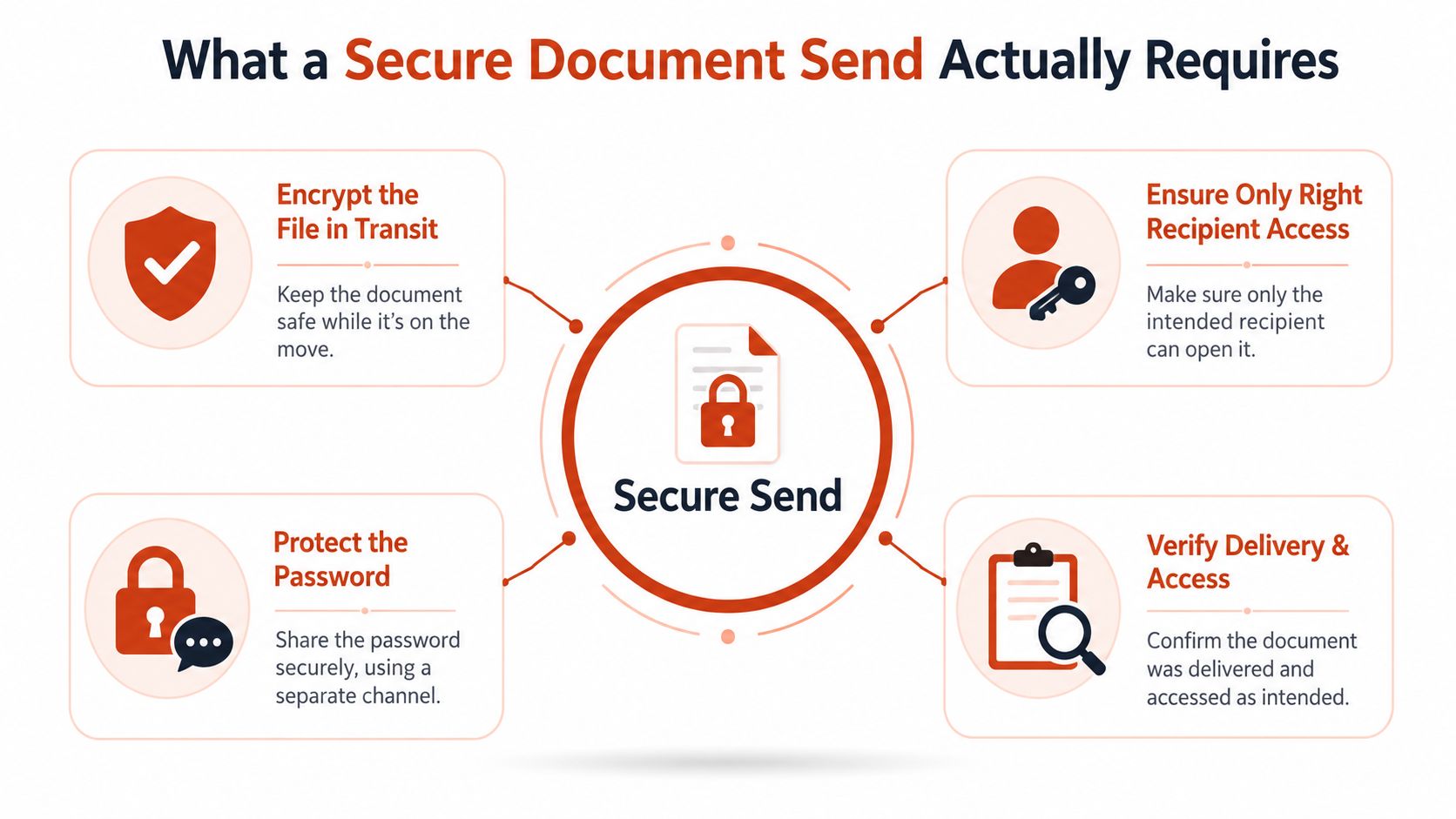
Transport is only the first layer
If the document is sensitive, email alone is too loose. Modern guidance from government and university security teams recommends encrypting confidential documents before sending, and sending the password through a separate channel rather than the same thread. The reason is simple. A mailbox can be forwarded, previewed on a lock screen, synced to another device, or exposed after delivery.
That does not mean email is useless. It just means email should carry the packet, while the document itself carries the protection. In practice, the secure send is not one trick. It is a stack.
Access, longevity and proof matter too
Once a document reaches the recipient, three more questions decide whether the send held up. Did only the intended reader get access. How long should that access last. Can you tell whether the right person opened the right pages.
Practical rule: if the recipient's inbox is compromised tomorrow, the file should still resist casual opening unless the attacker also has the separate control you chose.
That's why a mental checklist helps. Transport protects the route, access protects the open step, longevity controls what happens after delivery, and proof gives you evidence of engagement. Treating those as separate decisions keeps you from over-engineering low-stakes sends and under-securing high-stakes ones.
The Baseline Controls Everyone Should Use
The lowest-friction secure workflow starts before you attach anything. NIST recommends compressing and encrypting files before Internet transfer, and using email encryption features or S/MIME where available. That NIST guidance is useful because it draws a hard line between convenience and actual protection.
Encrypt the file, then send it
For an Office file, a PDF, or a ZIP archive, lock the file first with a strong method such as AES-256. Contemporary Office documents, PDF tools, and file-archiving utilities can all support that standard. A freelancer sending a proposal can zip the file with AES-256. A founder can password-protect the PDF before attaching it. An HR manager dealing with regulated material may need S/MIME if both sides have certificates.
Adobe distinguishes between two different controls in PDF workflows, restricting editing with a password and encrypting the entire PDF with a password or digital certificate. That difference matters. Editing restrictions limit what happens after opening. Full encryption blocks access until the cryptographic check passes. Adobe's secure PDF guidance is a clean reference point for that split.
Protect the password like it matters
A password-protected file is only as strong as the way you deliver the password. Government guidance says the password should not be sent in the same email. The same guidance recommends checking recipient addresses carefully and using stronger encryption methods such as AES-256 for files. A practical benchmark is 12 to 16 characters, mixed with upper and lower case, numbers, and symbols. That isn't a magic number, but it is a sensible floor.
Send the file one way, send the password another way, and never let the two land in the same inbox thread.
The question to ask is blunt. If the recipient's mailbox were compromised tomorrow, could an attacker still open the file. If the answer is yes, the baseline controls aren't doing enough. Secure send starts with the file itself, not with faith in the inbox.
Attachments vs Tracked Links
A raw attachment and a hosted document link are not the same thing, and most advice blurs that line. An attachment is a copy that leaves your control the moment it lands. A tracked link keeps a live connection back to the sender, so the document can be updated, expired, or revoked later.
When an attachment still makes sense
If the goal is to deliver a sealed copy with no ongoing interaction, an attachment can be fine. A tax form, a signed PDF, or a one-off internal memo may not need a live document page. But the trade-off is clear. Once the file is in someone's inbox, you lose visibility, and every forward creates another copy you can't manage.
That is the biggest reason attachment-only workflows age badly for sales proposals, investor decks, and client proofs. You can't tell whether the recipient opened the deck, passed it to a colleague, or opened the wrong version after an update. The file goes dark.
Why tracked links change the post-send experience
A hosted link gives you a different operating model. A sales team can send a proposal, then replace the file behind the same URL when pricing changes. A design agency can deliver proofs without forcing clients into email round-trips for every comment. A startup can circulate an investor deck that stays at one address while the content evolves.
Useful distinction: link security is not the same as authentication. If the link is forwarded, inbox access is compromised, or revocation is never set, the file can stay reachable until you close the door.
That's where EveryPage fits as one option. Anyone can upload a PDF and get a tracked link immediately, readers don't need an account, and the sender can keep the document as a durable asset rather than a one-off transfer. The limitation is straightforward, though. If you need a strict message-level security model with certificate handling on both sides, link sharing isn't the same thing as S/MIME. It's better for trackable distribution and controlled viewing, not for every regulated exchange.
Layering Expiry, Watermarks and Access Controls
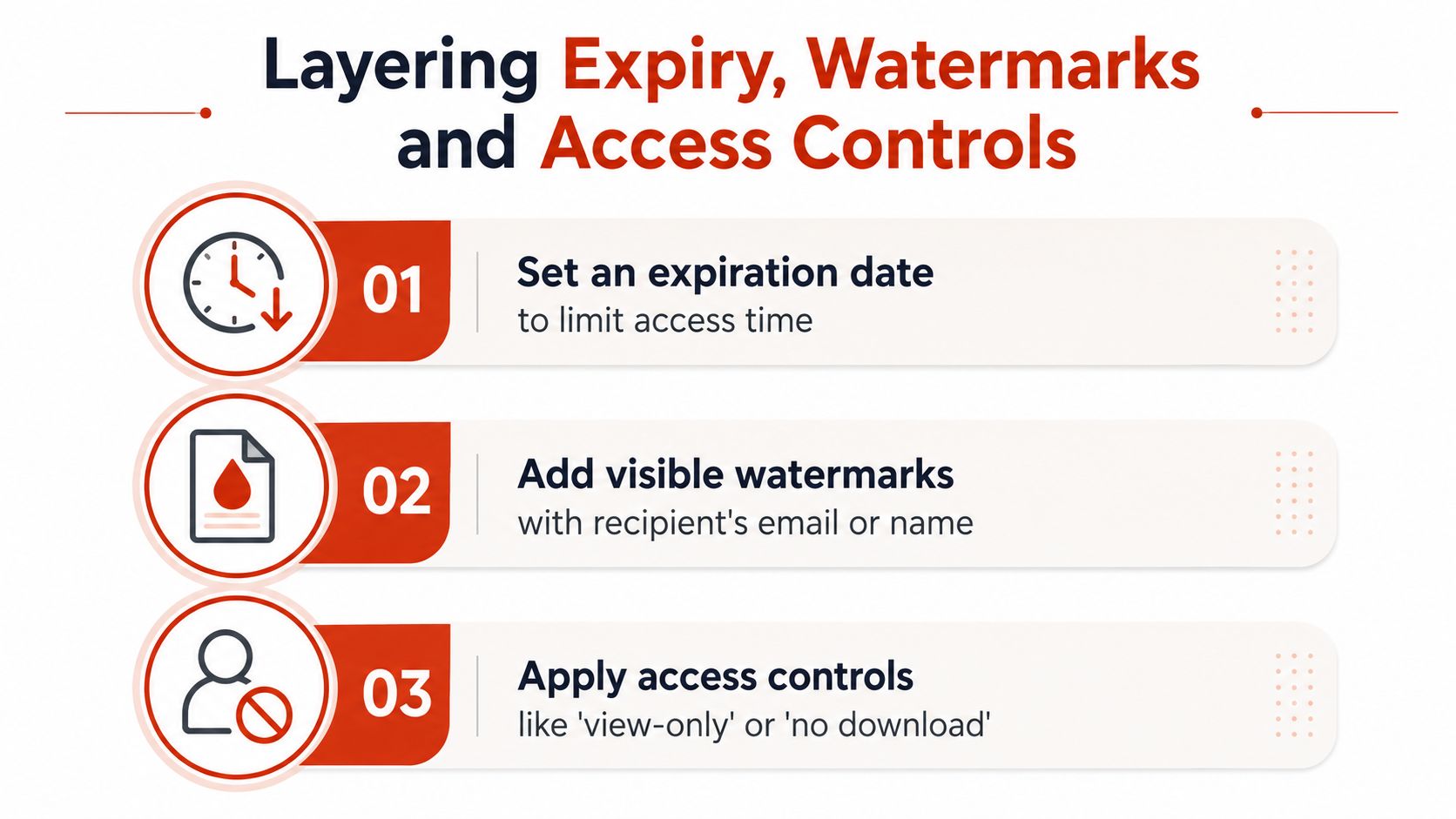
Once the baseline encryption is in place, the next move is to decide how much friction the document deserves. Not every file needs the same level of control. A policy acknowledgment, a freelance contract, and an investor update all have different exposure patterns, so the controls should be layered accordingly.
Expiry is a choice, not a religion
Gmail Confidential Mode supports expiration windows ranging from 1 day to 5 years, and it can require an SMS passcode for access. That makes expiry useful when the document has a natural end point, such as an investor update after the round closes or a deal memo after the negotiation window ends. EveryPage also lets links live permanently or expire on demand, so the sender decides whether the document is time-bound or durable.
Self-destructing links only make sense when the document's value drops after a set date. If the file remains operational, keep the link alive and change the control set instead of turning a useful asset into a dead end.
Add controls only where they earn their keep
Watermarking is useful when the issue is leakage rather than interception. A freelance contract with the recipient's name on every page creates friction for casual forwarding. Access controls can do even more. Domain allowlists can tie access to a specific company email, while view-only settings reduce the odds of casual copying. Some workflows also use view budgets, so access closes after a set number of opens.
A short way to think about it is this.
- HR policy acknowledgment: prioritise access proof and read tracking.
- Client contract: add watermarking so a forwarded copy is traceable.
- Investor update: set a clear expiry so the old version doesn't sit around after the raise closes.
The honest limitation is that these controls stop being meaningful once the file is downloaded and re-shared locally. They still help, but they don't create magical containment. That's why access policy should match the document's real sensitivity, not your anxiety level.
Verifying the Right Person Actually Read It
Encryption tells you who can open the file. It doesn't automatically tell you who did open it, whether they reached the pricing page, or whether the recipient previewed a notification and never touched the document itself. That gap matters, especially when a deal depends on a real human review rather than a delivery receipt.
Read receipts are not the same as reading behaviour
Plain email read receipts and open pixels are blunt instruments. They can tell you something happened, but not much else. A viewer may have previewed the email without opening the attachment. Someone else may have opened it on a shared inbox. A forwarded message can confuse the trail entirely.
| Method | What it confirms | What it misses | Best for |
|---|---|---|---|
| Email receipt | The message reached an inbox or a client acknowledged it | Whether the document opened, and by whom | Simple administrative confirmation |
| Attachment open notice | The file was opened in some form | Which pages were read, how long attention lasted, and whether the right person opened it | Basic delivery follow-up |
| Page-level analytics | Views, time on page, read-through funnel, re-read rate | Identity on its own, unless paired with a reader label | Sales, proposals, proofs, policy review |
| Pseudonymous reader identity | A consistent reader label without exposing the person's IP address | Direct personal identification | Privacy-sensitive workflows |
Privacy-first verification is the practical middle ground
Traditional trackers often tie behaviour back to network data. EveryPage takes a different route, using pseudonymous reader identities and page-by-page analytics such as views, time on page, read-through funnel, and re-read rate, while not storing IP addresses. Its approach is GDPR-friendly by design, with country resolved in flight and discarded. That gives you proof of engagement without turning the document into a surveillance device.
PDF read receipts are useful when you need confirmation that a proposal or policy got attention, but the value comes from page-level context. A founder can see if investors spent time on financials. A consultant can see which sections of a proposal held attention. An HR team can confirm a policy got read through, not just delivered.
What matters: proof of access is better than guessing. Proof of attention is better still.
Durable Links, Updates and Audit Trails
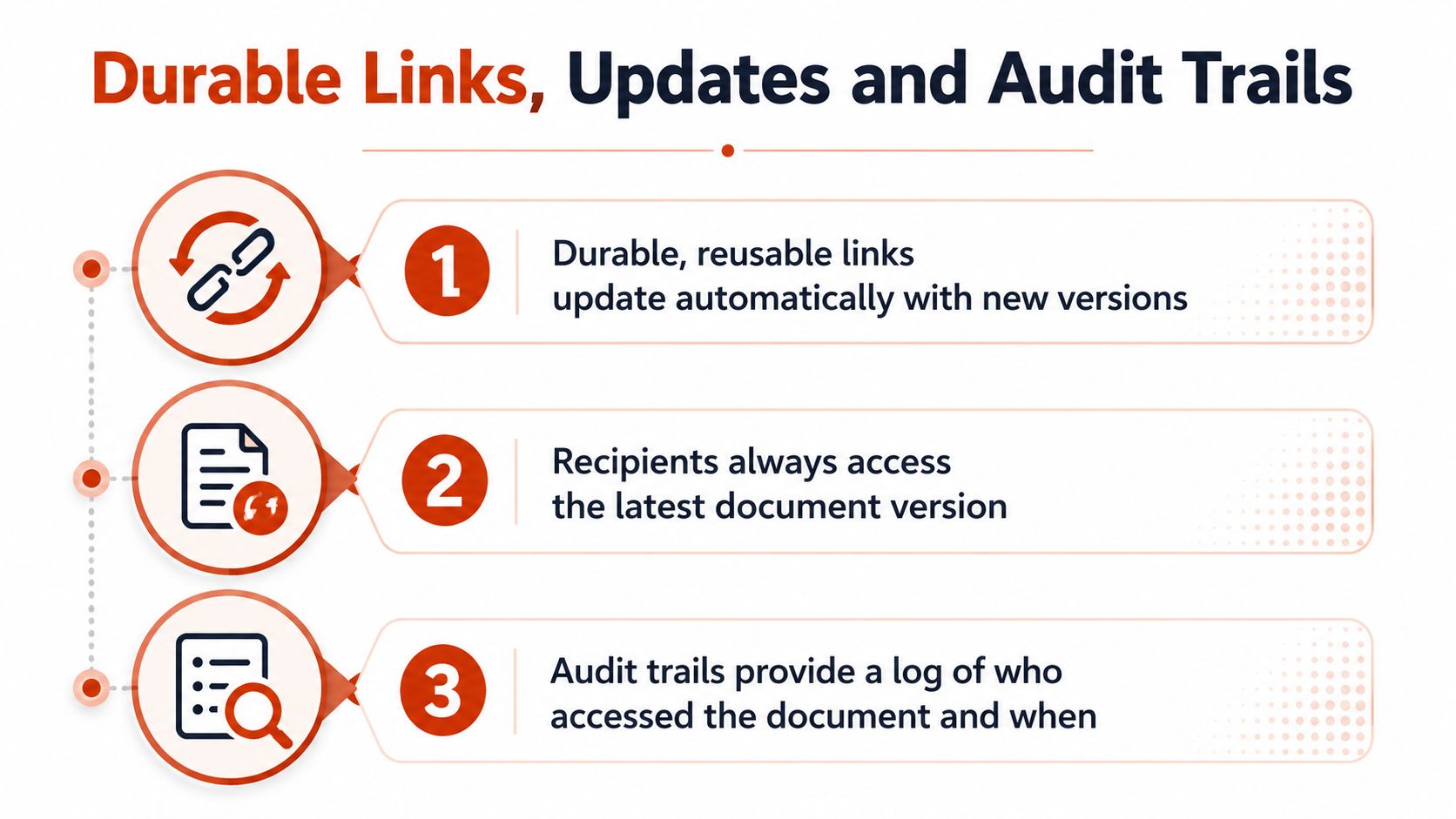
The biggest shift in secure document delivery is not encryption, it's whether the document stays useful after the first send. One-off attachments create a dead copy. Short-lived links can do the same if they're not managed carefully. Durable links keep the same address while the file behind it changes, which is a better fit for work that evolves.
Keep the same link while the file changes
Dynamic links are useful when the surface address should stay stable. A pitch deck gets revised between investor meetings. A contract changes during negotiation. A policy gets reissued annually. In those cases, a new attachment means a new send, a new thread, and new confusion about which version is current.
With PDF tracking, a durable URL can keep the same share point while the document is replaced behind it. QR codes keep working after the underlying file changes, so printed or embedded links don't break just because the content moved. That matters when the document is part of a process, not a one-off handoff.
Audit trails should show behaviour, not just delivery
Security teams often care about evidence. Who opened it, which pages were viewed, and when the reader came back. EveryPage's dynamic links, folder-level analytics, CSV export, and signed webhooks help preserve that record as the document changes over time. Aggregated analytics across folders can show patterns across related assets rather than forcing every file into a separate report.
The limitation is still real. No system can stop someone from screenshotting or retyping the content once they've seen it. Audit trails are evidence of access and engagement, not a guarantee that every copy disappears. That's the right way to think about them. They support accountability, version control, and follow-up. They don't replace judgment.
A Practical Field Guide You Can Use Tomorrow
For a low-stakes send, encrypt the file if it contains anything private, attach it, and move on. For a moderate-stakes proposal, use a tracked link, add password protection, and set a sensible access window. For a high-stakes regulated file, use stronger encryption, separate password delivery, and a controlled sharing method that gives you reader evidence as well as access control.
Most mistakes are boring, and that's why they keep happening. The password lands in the same thread as the file. The link gets copied into a group reply. The document stays open after the raise closes. Or somebody sends the attachment once and forgets it exists for years.
The better rule is simple. Pick the control stack that matches the document's life after send, not just the moment of send.
EveryPage gives you tracked PDF sharing with page-level analytics, password protection, watermarking, and dynamic links that can stay live or expire when you choose. If you need a secure document workflow that also shows who read what, visit EveryPage and see how it handles durable sharing without forcing readers to create an account.
See who reads your next PDF.
Try EveryPage free