6 Example Multimedia Presentation Ideas
Nick · Published 22 August 2026
A strong example multimedia presentation combines a clear use case with a browser-viewed PDF, embedded media or hotspots, and a deliberate way to measure or collect reader response. EveryPage makes that practical with page-level analytics, no reader account, and immediate tracked sharing.
You've sent the pitch deck, proposal, or proofing sheet, then waited for a useful reply. Instead, you get “looks good” with no indication of which pages mattered, whether anyone reviewed the pricing, or where the next conversation should begin. The PDF may be polished, but as an email attachment it gives you little evidence about what happened after delivery.
The six examples below treat a PDF as a durable, browser-based multimedia presentation, not a static file. Each one uses a different combination of video, audio, interactive hotspots, viewer modes, protection, lead capture, comments, and page-level engagement signals. EveryPage is one implementation option: anyone can upload a PDF and share a tracked link immediately, while readers need no account or app.
Watch the practical decisions. Where should media appear? Which pages need hotspots? Should the document be gated or password protected? Is standard, flipbook, swipe, or magazine viewing the right fit? And how can you understand reading depth without storing reader IP addresses?
Table of Contents
- 1. Sales Proposal with Page-Level Engagement Tracking
- 2. Investor Pitch Deck with Engagement Depth Indicators
- 3. Client Project Report with Read-Through Verification
- 4. Photography Proofing and Selection Sheet with Embedded Feedback
- 5. Policy and Compliance Document with Read-Through Audit Trail
- 6. Marketing Brochure and Gated Content Campaign with Lead Capture
- Multimedia Presentation, 6-Item Engagement & Verification Comparison
- Turn These Presentation Examples into a Working Format
1. Sales Proposal with Page-Level Engagement Tracking
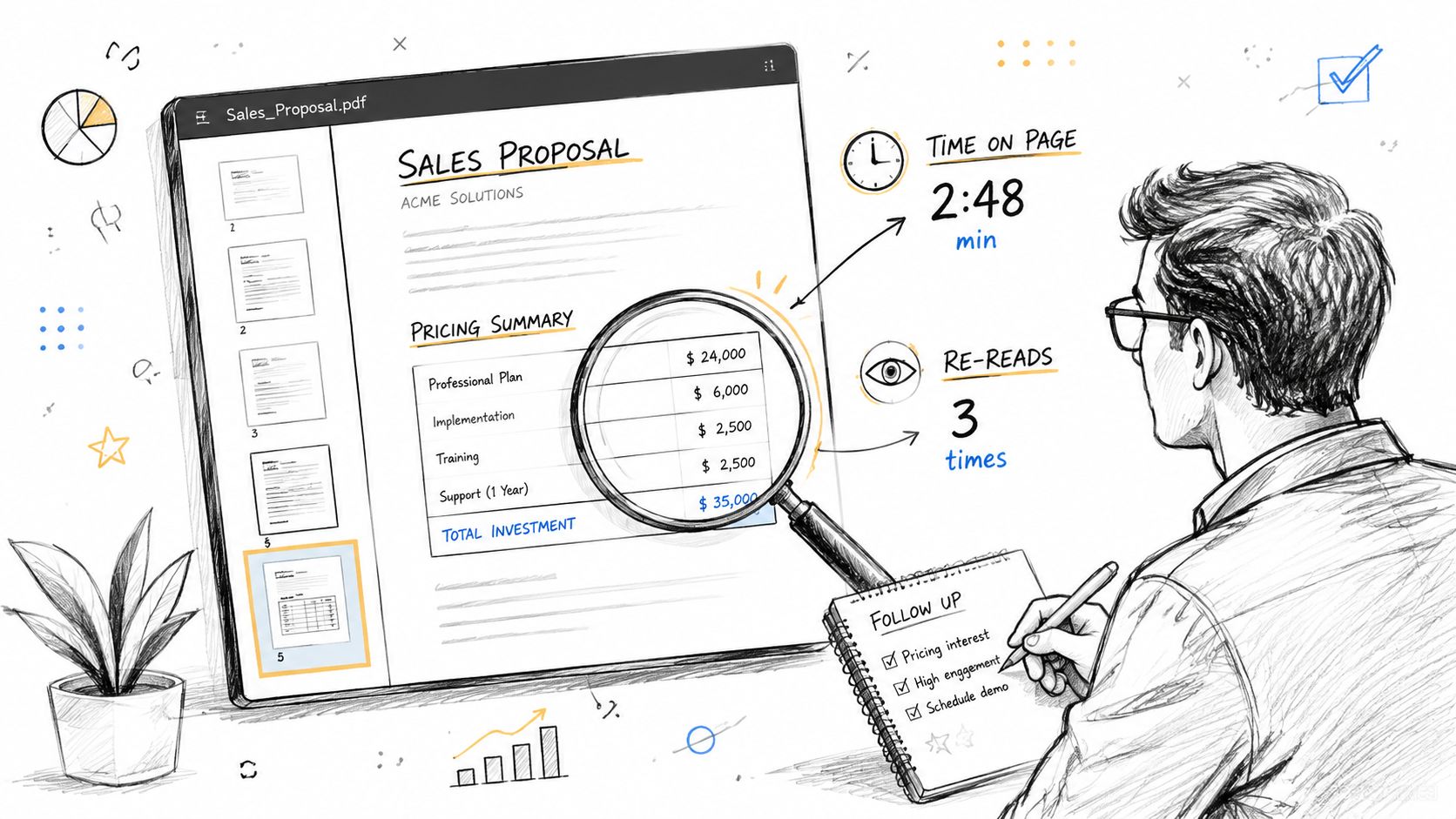
A sales proposal should help a buyer decide, not just document what a seller hopes they'll notice. A B2B SaaS account executive might send a customised proposal to a five-person buying committee, then use EveryPage's page-level analytics to see which sections attracted attention. If three people open it, two spend substantial time on pricing, and one returns to implementation timelines, the next conversation can address those subjects directly rather than follow a generic follow-up script.
The same approach works for independent consultants. A freelancer sending a project scope and estimate might discover that the client repeatedly revisits deliverables but skips the timeline. That pattern doesn't prove the client objects to the schedule, but it gives the consultant a useful prompt to clarify assumptions before approval.
EveryPage shows views, time on page, read-through behaviour, and re-read rate in a browser viewer. That's more actionable than an email attachment, where delivery says nothing about attention or return visits. The product's page-level analytics are designed to show engagement while avoiding storage of reader IP addresses, which supports a more privacy-conscious workflow.
Practical rule: Treat re-reading as a question to investigate, not a buying signal to celebrate.
Build the proposal around decisions
Use the standard viewer when the document needs a formal, document-like presentation. Add password protection for sensitive pricing, intellectual property, or client-specific commercial terms. A permanent link can remain available throughout an internal review cycle, and EveryPage also supports dynamic links that preserve the URL when you replace the underlying PDF.
Keep the core proposal concise, then use hotspots only where they remove friction. A product demonstration video can sit beside a relevant capability page. An audio explanation may help a technical stakeholder understand an architecture diagram. Add page jumps to move a reader from an executive summary to supporting evidence, rather than scattering decorative interactions across every page.
For a practical workflow, see this guide to sales proposal PDF tracking. Export analytics to CSV when a sales manager needs aggregate insight into which sections create questions and which pages are routinely ignored.
2. Investor Pitch Deck with Engagement Depth Indicators
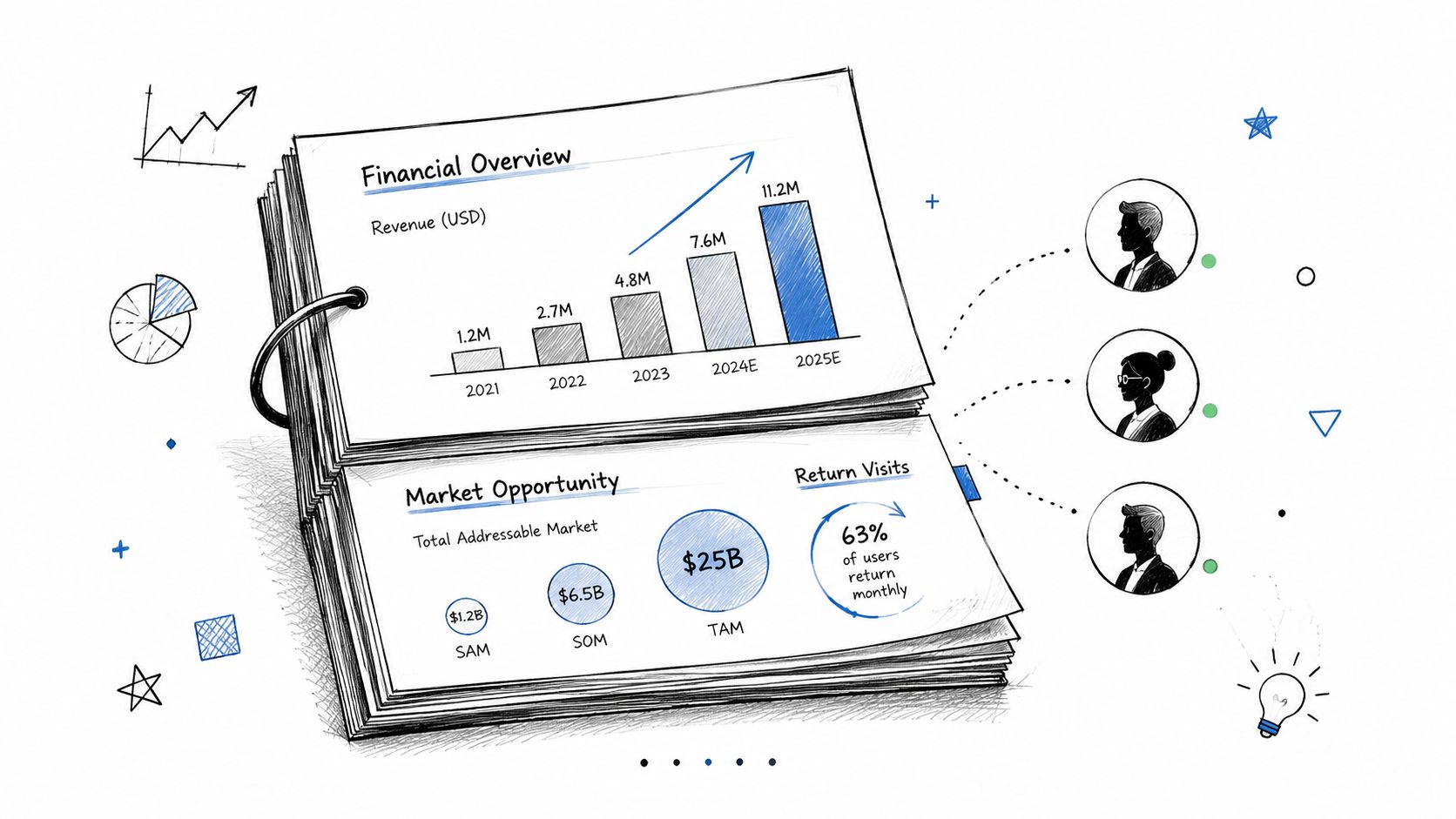
Fundraising decks often go into a silent review process. A founder may send the same PDF to investors, advisers, and partners, then struggle to distinguish genuine interest from a polite download. A browser-viewed pitch deck makes the document more useful because the founder can examine which financial, market, team, or product pages receive sustained attention and which are passed over.
For example, a founder can create separate links for different investor audiences. One version might put market evidence and commercial traction near the front. Another might emphasise technical defensibility or impact metrics. The content should remain truthful and consistent, but the order and explanatory depth can reflect the questions each audience is likely to ask.
A pitch deck becomes multimedia when the media serves the investment narrative. Use a short product video to demonstrate behaviour that screenshots can't explain. Add an audio walkthrough for a complex technical slide if the deck will be reviewed asynchronously. Place hotspots on team pages to open biographies or professional profiles, and use page jumps so a reader can move from a headline claim to its supporting assumptions.
Make attention useful, not merely visible
EveryPage offers standard, flipbook, swipe, and magazine viewer modes. Flipbook suits a polished, presentation-style deck, while swipe is more natural for mobile review. Magazine mode can give a visual narrative more space, but it may be less appropriate for dense financial tables. Test the deck on a phone before distributing it, especially if investors are likely to review it between meetings.
A lead capture form can collect relevant context before access, such as an investor's name, organisation, or area of interest. Don't turn the gate into a long questionnaire. The aim is to identify the reader and create a useful follow-up, not to make a deck feel like an application form.
The pitch deck investor analytics guide covers how to use return visits and page-level behaviour when deciding whom to contact first. Review the analytics alongside direct replies. A frequently revisited slide may signal importance, confusion, or missing context, and those possibilities require a conversation to separate them.
3. Client Project Report with Read-Through Verification
A client report can be a strategy document, audit, research summary, design rationale, or final delivery pack. The recurring problem is not file transfer. It's knowing whether the people who need to act on the work have reached the relevant sections.
A consultant delivering a strategy report to a leadership team can place an executive summary first, then support it with financial projections, operational recommendations, risks, and implementation steps. Page-level analytics can show whether readers move through the report and where they pause or return. If one stakeholder focuses on operations while another concentrates on commercial assumptions, the consultant can structure the debrief around those different concerns.
For a UX researcher, the distinction between a skipped methodology section and a heavily revisited findings page matters. It may indicate that the product team wants action before process detail. The researcher can respond with a short follow-up brief while keeping the full report available as a durable reference.
A read-through record helps you plan the conversation. It doesn't prove that a reader understood the recommendation.
Design for review and response
Use the standard viewer for formal reports. Start with a clear summary, label sections consistently, and put the requested client action near the relevant conclusion. A video walkthrough can explain a dashboard or prototype recording. Audio can provide context for a visual audit. Interactive hotspots can connect an observation to a source, appendix page, or recommended action.
Password protection is sensible when the report contains confidential client data. For time-sensitive material, an expiry control can be selected. For ongoing reference, publish a permanent link instead. EveryPage treats expiry as a sender-controlled option, so a document can remain available indefinitely rather than being treated as a disposable transfer.
Comments and annotations keep questions beside the relevant page, reducing the need to reconstruct context across email threads. CSV export can support project archives and internal delivery records. Keep access logs separate from your interpretation of the work, and don't present page time as a substitute for formal acceptance or sign-off.
4. Photography Proofing and Selection Sheet with Embedded Feedback
A photography proofing presentation has two jobs. It must make visual selection easy, and it must capture feedback precisely enough that the photographer doesn't have to decode a chain of vague emails.
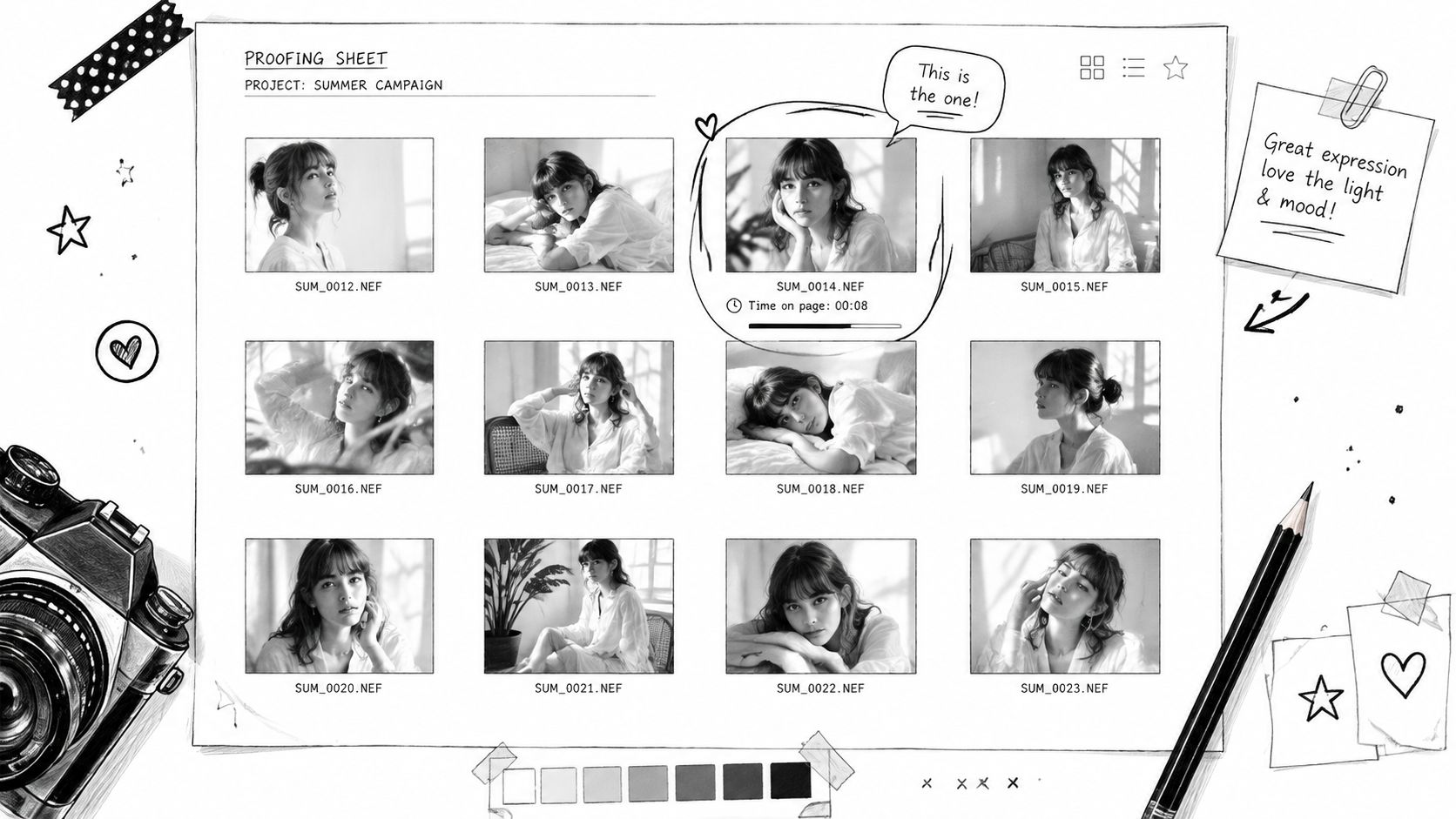
A wedding photographer might organise a proofing PDF into ceremony, reception, details, and group images. Magazine mode can create a gallery-like browsing experience, while clear section pages help the couple move through a large set of proofs. The couple can comment directly on an image with notes such as “crop tighter on subject” or “love this one”. The photographer then has a central record of the requested changes.
Page-level behaviour adds context, but it shouldn't be mistaken for selection. A client lingering on an image may love it, be comparing it with another, or have paused while discussing it with someone else. Comments, explicit selections, and photo proofing workflows provide the decision. Analytics can help identify which categories deserve a follow-up question.
Use the PDF as a visual workspace
A commercial product photographer can share lifestyle images, hero shots, usage variations, and proposed crops in one browser-viewed asset. If the marketing team keeps returning to contextual imagery, that's useful input for the next shoot, but the team should still confirm the creative direction directly.
- Organise by decision: Separate images by scene, format, crop, or intended channel so clients can give specific feedback.
- Invite page comments: Tell reviewers to annotate the image itself rather than sending descriptions through email.
- Choose magazine mode carefully: It suits visual browsing, but a standard viewer may be clearer when each page contains detailed production notes.
- Use a durable link: Permanent access helps clients revisit proofs, while an optional expiry can suit a tightly managed selection window.
- Capture rights information: A lead capture form can collect usage details or approval notes when those fields are part of the workflow.
EveryPage's comments, annotations, and photo proofing features are useful when feedback needs to stay attached to the shared document. The limitation is that it won't replace a full digital asset management system for a large, complex archive. Keep the final approved images and licensing records in the system designed for long-term asset administration.
5. Policy and Compliance Document with Read-Through Audit Trail
Policies are often delivered as attachments that employees can open, overlook, or lose in an inbox. A browser-viewed policy presentation gives HR and compliance teams a durable distribution point, with page-level evidence that can support follow-up.
An international organisation might publish a data-handling policy with separate links for departments or roles. The first page should explain the policy's purpose, effective date, required action, and escalation route. Subsequent pages can use hotspots to link to internal resources, training videos, reporting forms, or related policies. Audio narration may help employees who prefer listening, but the written document still needs to stand on its own for accessibility and auditability.
EveryPage's read-through funnel and CSV export can show document progress without storing employee IP addresses. Its published design uses a salted one-way hash to create a pseudonymous reader label while discarding the original address, which supports returning-reader analysis without retaining raw IP data. That privacy-first approach can help organisations think carefully about GDPR-friendly measurement, though compliance teams still need their own lawful basis, retention rules, access controls, and governance.
Practical rule: A page view is evidence of access, not evidence that an employee understood or agreed to a policy.
Separate acknowledgement from engagement
Use a lead capture form when you need a named acknowledgement, such as an employee name, identifier, or sign-off date. Password protection can restrict access to an internal audience. A permanent link can act as a stable policy reference, while a new link can be issued when a major revision requires a distinct review cycle.
Segmenting by department can make reporting more useful, but it also creates administrative work. Keep a clear naming convention and document which version each link serves. Export CSV records on a planned schedule and define who may access them. Don't collect more personal information than the review process requires.
EveryPage's limitation is important for formal compliance programmes. Read-through analytics and captured acknowledgement can support an audit trail, but they don't replace a dedicated learning management system, legal sign-off process, or an organisation's HR record. Use the presentation as one controlled layer in a broader process.
6. Marketing Brochure and Gated Content Campaign with Lead Capture
A product brochure, whitepaper, or case study can become a measurable marketing presentation when the content remains easy to browse and the next action is clear. The PDF might include a product video, audio commentary from a subject specialist, interactive hotspots to technical pages, or a calculator link that helps readers apply the information.
A B2B team publishing a finance-focused whitepaper can place a simple lead capture form before access, then examine which chapters readers view and revisit. A marketing team embedding a case study in an email can add a QR code to event signage or printed collateral, giving offline audiences a direct route to the same durable document URL.
The content should earn the form. Keep required fields limited to what sales or marketing will use, then ask additional qualification questions later. If a reader encounters a long form before seeing any value, the gate becomes the main experience rather than the document.
Connect content behaviour to follow-up
EveryPage supports lead capture forms, CSV export, and integrations including Zapier, Make, webhooks, Slack, and GA4. A team can route captured details to its existing workflow, but automation should be conservative. High attention on a pricing page may justify a sales task. It shouldn't automatically label someone ready to buy without checking the source, role, and stated interest.
Use separate links for different brochure versions, campaigns, or channels. Compare the page-level behaviour qualitatively, then review the actual leads. A page that attracts attention may need clearer explanation rather than more promotional emphasis.
For implementation details, see EveryPage's lead capture PDF workflow.
- Use hotspots selectively: Link a product demonstration or technical explanation where readers are likely to need it.
- Choose the viewer for the channel: Swipe works naturally on mobile, while flipbook or magazine modes can suit a visual campaign.
- Add QR codes thoughtfully: Put them on print materials with a clear reason to scan, not as decoration.
- Keep links durable: Dynamic links can preserve the URL and QR code when the PDF is replaced with an updated version.
- Respect privacy: Explain what information the form collects and use analytics without storing reader IP addresses.
EveryPage is our product, so its trade-offs should be explicit. It provides document-centred analytics and capture, but it isn't a complete marketing automation platform or a substitute for a full CRM's lead-scoring model. Connect it to the systems you already use, and keep human review in the process.
Multimedia Presentation, 6-Item Engagement & Verification Comparison
| Use Case | Implementation complexity | Resource requirements | Expected outcomes | Ideal use cases | Key advantages |
|---|---|---|---|---|---|
| Sales Proposal with Page-Level Engagement Tracking | Low, upload PDF, share link, optional password/expiry | Minimal, single rep access, no integrations, flat pricing plans | Visibility into page-level engagement; identify drop-off and re-read signals to prioritize follow-up | B2B proposals, RFP responses, bespoke quotations | Clarifies prospect interest, GDPR‑compliant tracking, no account required, predictable pricing |
| Investor Pitch Deck with Engagement Depth Indicators | Low–Medium, use flipbook/viewer mode, optional lead forms, dynamic links | Moderate, prepare deck variants, optional lead capture and updates | Qualify investor interest, prioritize follow-ups, iterate messaging based on re-reads | Seed to Series rounds, targeted VC outreach, investor qualification | Reveals genuine investor attention, dynamic updates, lead capture and privacy-first analytics |
| Client Project Report with Read-Through Verification | Low, upload report, enable CSV export and watermarking | Minimal–Moderate, CSV exports for archives, optional comments/annotations | Proof of delivery and review; auditable read logs to support billing and follow-ups | Consulting reports, audits, deliverable handovers | Objective proof of review, billing and archive support, re-read signals for concern areas |
| Photography Proofing and Selection Sheet with Embedded Feedback | Low–Medium, enable magazine viewer, comments and proofing workflows | Moderate, inline annotations, watermarking, gallery organization | Centralized feedback, selection signals from dwell/re-reads, fewer revision cycles | Photo proofing, design comps, editorial galleries | Timestamped client annotations, preference signals from dwell time, secure proofs |
| Policy and Compliance Document with Read-Through Audit Trail | Medium, setup lead capture/acknowledgment, segmentation, password gating | Moderate, CSV export, per-viewer watermarking, role-based links | Auditable proof of distribution and review for compliance audits | HR/legal compliance rollouts, GDPR/SOX acknowledgments, contractor onboarding | Compliance-grade audit trail, privacy-first design, scalable flat pricing |
| Marketing Brochure and Gated Content Campaign with Lead Capture | Medium, configure lead capture, CRM integrations, embeds and QR codes | Moderate–High, multi-field forms, Zapier/Make integrations, campaign variants | Generate identified leads and engagement scores; route high-engagement prospects to sales | Gated whitepapers, product brochures, event collateral, demand gen campaigns | Combines lead gen with page-level analytics, CRM automation ready, no per-lead fees |
Turn These Presentation Examples into a Working Format
Choose the format according to the immediate job. A sales proposal or investor pitch deck needs persuasion, clear navigation, and signals that help prioritise follow-up. A client report needs delivery visibility and a structured review path. A proofing presentation needs comments, selections, and visual context. A policy document needs controlled distribution and an auditable review record. A gated brochure or whitepaper needs a useful exchange between content access and lead information.
The implementation sequence can stay simple:
- Clarify the audience and next action: Decide whether readers should approve, reply, select, acknowledge, or book a conversation.
- Design a concise PDF: Give each page one clear job, use accessible text, and make the document understandable without media.
- Add media where it removes friction: Use video for demonstrations, audio for explanation, and hotspots for relevant navigation or supporting evidence.
- Choose the viewer mode: Standard suits formal documents, flipbook suits presentation-style browsing, swipe supports mobile reading, and magazine mode favours visual layouts.
- Protect or gate sensitive content: Use passwords, watermarking, lead capture, or an appropriate link policy based on the audience and risk.
- Publish a durable link: Permanent links support ongoing reference, while expiry remains an optional sender-controlled measure.
- Review behaviour with direct feedback: Page time, read-through, and re-read patterns can guide questions, but comments, replies, comprehension checks, and formal approvals still matter.
Microsoft PowerPoint remains the most influential example of multimedia presentation software. It was first released in 1987, Microsoft acquired it that same year for $14 million, and Office bundling helped accelerate adoption by 1990. By the early twenty-first century, it was estimated to hold about 95% of the presentation software market, as described in Microsoft's PowerPoint retrospective. The lesson isn't that every document should become a slide deck. It's that a familiar asset becomes more useful when its format, media, distribution, and feedback loop match the decision readers need to make.
EveryPage offers Free, Basic at $9 per month, and Pro at $29 per month, with flat per-account pricing and no per-user fees, as shown on its published pricing and guides page. Its honest limitation is that engagement data doesn't replace conversation, comprehension checks, or formal e-signatures. Use it to make a PDF more observable and interactive, then use human judgement to decide what the reader's behaviour means.
Create your next proposal, pitch deck, report, proofing sheet, policy, or gated brochure as a durable browser-viewed PDF with page-level analytics, hotspots, viewer modes, and privacy-conscious sharing. Visit EveryPage to upload a document and turn it into a trackable multimedia presentation without requiring an account from you or your readers.
See who reads your next PDF.
Try EveryPage free