Custom Flip Books: A Practical Guide for 2026
Nick · Published 11 August 2026
You've probably sent a pitch deck, a proposal, or a set of client proofs and then watched the inbox go quiet. The file got delivered, but you still don't know whether anyone opened it, which pages they read, or whether the document helped the conversation move forward.
That gap is why custom flip books matter. They sit between a static PDF attachment and a tracked web experience, so the document feels more polished without losing the ability to measure what happened after you hit send. For teams that need durable, shareable assets rather than disposable files, the format changes the job of a document from “sent” to “seen and understood”.
Table of Contents
- Why Custom Flip Books Matter Beyond Visual Polish
- How Flip Books Work and Where They Came From
- Choosing the Right Viewer Mode for Your Document
- What Page-Level Analytics Tell You
- Creating and Distributing Your Custom Flip Book
- Comparing Flip Book Platforms by Use Case
- When a Custom Flip Book Is the Right Choice
Why Custom Flip Books Matter Beyond Visual Polish
A sender usually has one follow-up question after sharing a PDF: which pages did the recipient read? That question matters because a document can look polished and still leave no evidence of attention.
Custom flip books answer a practical need before they answer an aesthetic one. The page-turn effect can make a document feel more intentional and on-brand, but the more useful change is that the file becomes a trackable asset instead of a silent attachment. That matters when follow-up depends on whether the pricing page was opened, whether proofing comments were left, or whether a meeting invite should follow real interest rather than guesswork.
Presentation without the dead end
A hosted flip book gives the sender a controlled reading environment. It can include a branded cover, a clearer call to action, and page-level visibility that a file sent by email cannot provide on its own.
Practical rule: if a document is meant to influence a decision, the format should reveal how people interact with it.
That is where the difference between polish and usefulness becomes visible. A glossy presentation that cannot be measured stays decorative. A durable document that can be updated, tracked, and shared cleanly keeps working after the first send, which is why the format fits sales decks, client proofs, brochures, and policy acknowledgements better than one-off throwaway attachments.
What actually changes for the sender
The sender gets a clearer read on audience behaviour, and that changes the next action. Instead of asking whether the file was received, the question becomes which pages held attention and what needs a follow-up.
That does not mean every document needs animation. It means some documents need a reading experience that signals care, preserves the brand, and gives the sender evidence of engagement. In practice, that combination separates a nicely designed file from a document that supports a real workflow.
How Flip Books Work and Where They Came From
A flip book works because each page changes a little from the one before it. When a reader flips quickly, the brain blends those still images into apparent motion through persistence of vision, which the UK's Ingenium explains as the mind's inability to process each frame individually fast enough to keep them separate (Ingenium's flipbook explanation).
That principle is older than digital publishing. The modern custom flip book format traces back to 1868, when English printer John Barnes Linnett patented the kineograph. The Museum of the History of Science at Oxford notes that flip books became among the biggest-selling optical toys in the late 19th and early 20th centuries, and a related French design called the filoscope was patented in 1897 (historical overview). The useful part is not nostalgia. It is that the same page-by-page illusion still drives how the format works today.
The craft still matters in print
Print flip books still depend on file setup before anything goes to press. The motion has to be planned first, then each frame has to change only slightly from page to page. The U.S. Patent and Trademark Office's flipbook instructions tell makers to start at the back of the book, draw the first picture, and repeat across 24 pages, shifting the moving element just enough each time to stretch the action across the whole book (USPTO flipbook instructions).
For production, the working standard is a high-resolution PDF with one frame per page, CMYK colour mode, 300 DPI artwork, and 3 mm (0.125 in) bleed when imagery runs to the edge (printing guidance). Those settings reduce trim risk, colour shift, and softness in small-format motion sequences.
Before converting a PDF into a digital flip book, I check the source file the same way I would for any presentation asset. Keep the page size consistent across the whole document, use a single trim size for every page, and export at the final display dimensions rather than shrinking a large layout after the fact. A clean, lightweight PDF is easier to load in a browser, easier to share, and less likely to create lag on mobile devices. If the file has heavy background art or image-only pages, compress those assets before export so the experience stays responsive without turning the visuals muddy.
A practical export setup is usually simpler than teams expect. Keep text live where possible, avoid flattening everything into one huge image, and test the final PDF on both desktop and phone before distribution. If the document is meant to support sales, proofs, or internal review, the conversion should preserve legibility first and motion second. A flip book that looks polished but loads slowly or blurs key content does not help engagement.
A typical flipbook is compact rather than sprawling. VideoToFlip describes one as a sequence that can run from 20 to 100 pages, while NYFA describes it as a book where an audience sees moving images by flipping static pictures in rapid succession (flipbook basics).
Why the format survived
The durable part of the format is the sequence, not the paper trick. Each page acts like a frame, so the reader's behaviour is the engine of motion. That same structure maps neatly to digital document sharing, which is why flip books moved from a novelty object to a presentation layer that still feels intuitive to readers. It also explains why the format can outperform a standard PDF in some cases, while adding little more than decoration in others. The difference shows up when the presentation is worth tracking, sharing, or revisiting.
Choosing the Right Viewer Mode for Your Document
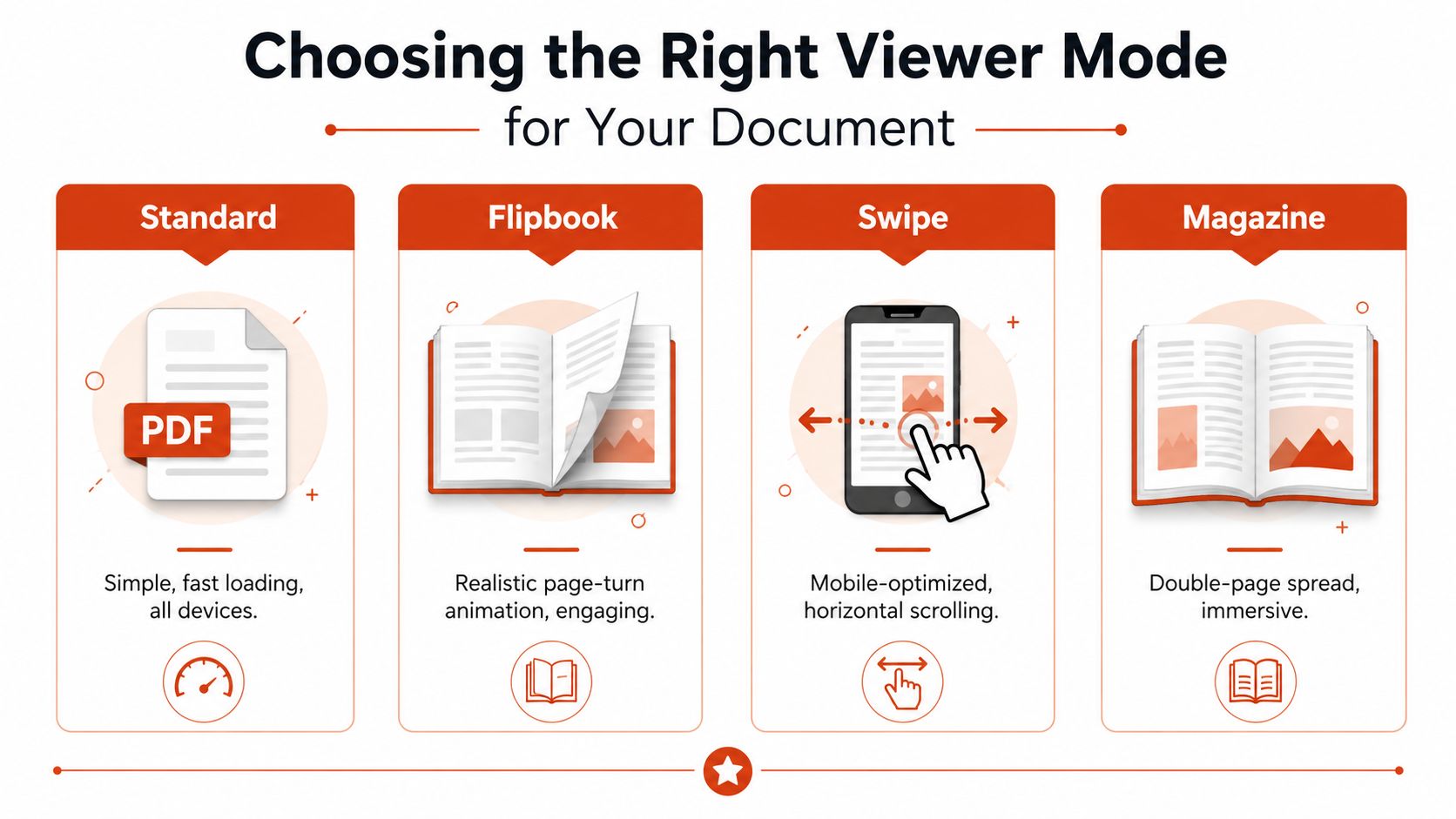
A good viewer mode helps the document do its job. A poor one puts friction between the reader and the content. The right choice depends on what the reader needs to do, how much visual context the material carries, and whether the document will be read mostly on desktop or on a phone.
Standard for clarity, swipe for mobile, magazine for spreads
Standard mode suits compliance docs, policies, and anything that needs clean readability with minimal visual fuss. It stays out of the way, which matters for documents where the reader should focus on the text rather than the interface.
Flipbook mode fits sales proposals, pitch decks, and branded collateral that benefit from the tactile sense of turning pages. It works well when the goal is to make the document feel more considered than a plain PDF, while keeping the page-by-page structure intact.
Swipe mode is the better fit for mobile-first reading. A brochure, an event handout, or a short guide can feel much easier to use when the reader moves horizontally with a finger instead of relying on a page-turn gesture.
Magazine mode suits catalogues, lookbooks, and any document built around double-page spreads. The paired-page view preserves layout and composition in a way that single-page rendering can flatten.
A viewer mode should serve the content first. If the format fights the document, the reader notices before they notice the brand.
Match the mode to the outcome
The strongest setups often layer interactive elements on top of the chosen mode. Hotspots can direct readers to related pages, video can clarify a product demo, and page jumps can help someone skip to a section they need. EveryPage's viewer modes documentation covers the four available layouts, standard, flipbook, swipe, and magazine, in one place.
A compliance memo does not need page-curl drama. A portfolio may need magazine spreads. A sales deck may work better in flipbook mode if the goal is to make the document feel more like a guided experience than a downloadable attachment. The better question is which mode gets the reader to the right page with the least friction.
What Page-Level Analytics Tell You
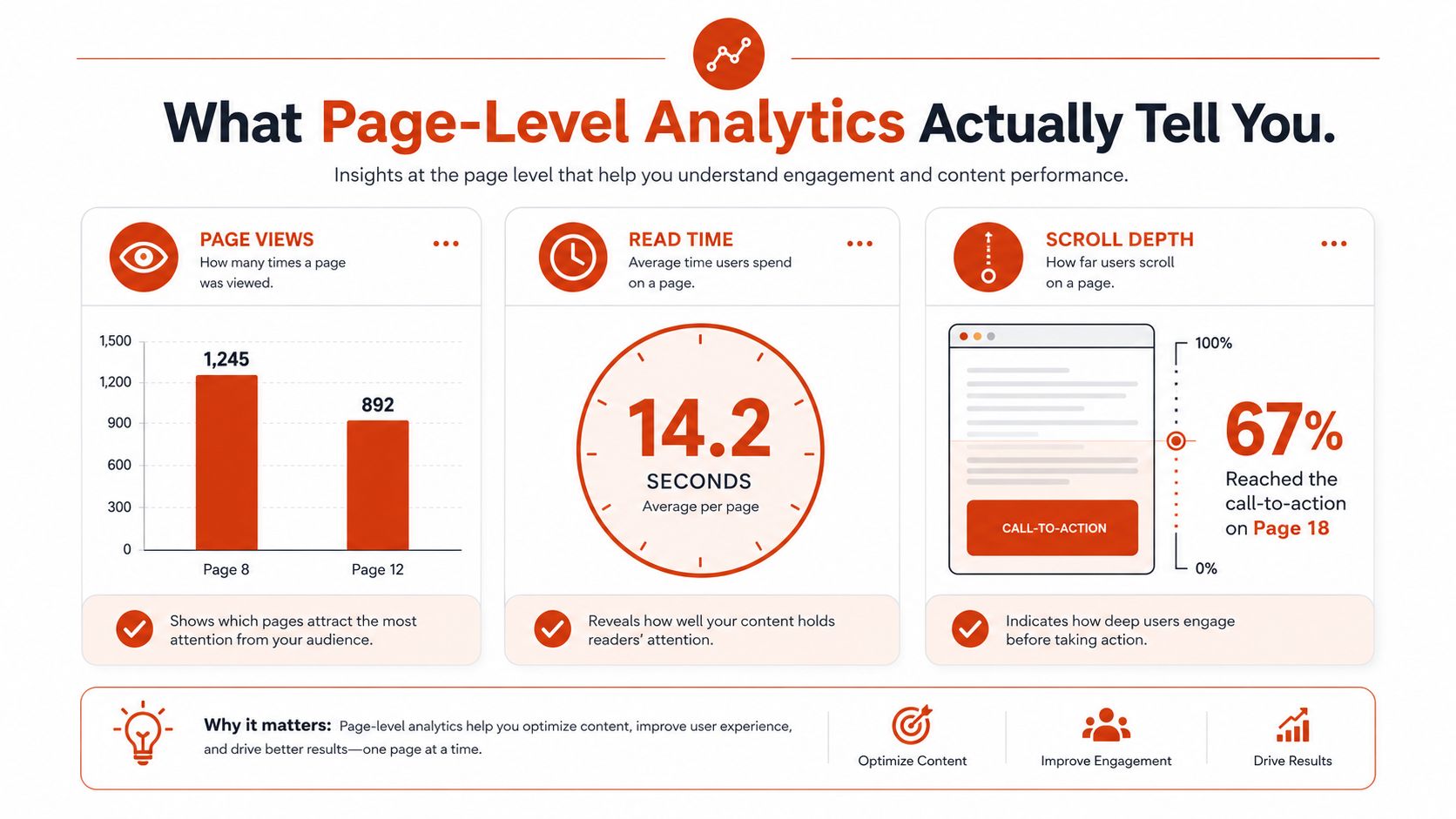
A shared document becomes useful for follow-up only when you can see behaviour, not just delivery. Page-level analytics turn a document into a signal source, and that signal matters most when it shows how someone moved through the content, not merely whether they received it.
The metrics that matter in practice
FlippingBook says its analytics can track views, visitors, downloads, shares, prints, and logo clicks, while Flipsnack says its analytics tracks views, time spent, clicks, and downloads and allows CSV export (FlippingBook stats page). Those outputs are useful because they change a follow-up from generic to specific.
For a sales team, the useful pattern might be that a prospect spent longer on the pricing page than on the case studies. For an investor deck, a second pass through the financials can signal that the recipient is preparing for a deeper conversation. For a proofing workflow, repeated visits to a page can show where a client is still uncertain.
A metric is only useful when it supports a decision.
Privacy changes how trustworthy the data feels
Analytics often create a tension between visibility and trust. EveryPage handles page-level reader analytics without storing IP addresses, using salted one-way hashes and country resolution in flight, then discarding the address. That makes the tracking model more privacy-first and more aligned with GDPR-friendly expectations, especially when readers don't need an account to view the document.
Practical rule: if a reader has to log in just to open a document, the sharing flow is probably too heavy for a proposal or proofing use case.
The trade-off is straightforward. More visible behaviour data can help the sender follow up well, but only if the reader experience stays light and the privacy posture stays credible. That balance matters for policy acknowledgements, client delivery, and sales materials where the goal is evidence of engagement, not surveillance.
The full tracking workflow is described in EveryPage's PDF tracking page at everypage.co/pdf-tracking. The point is simple. One document was opened, another was read, and page-level analytics help separate those outcomes.
Creating and Distributing Your Custom Flip Book
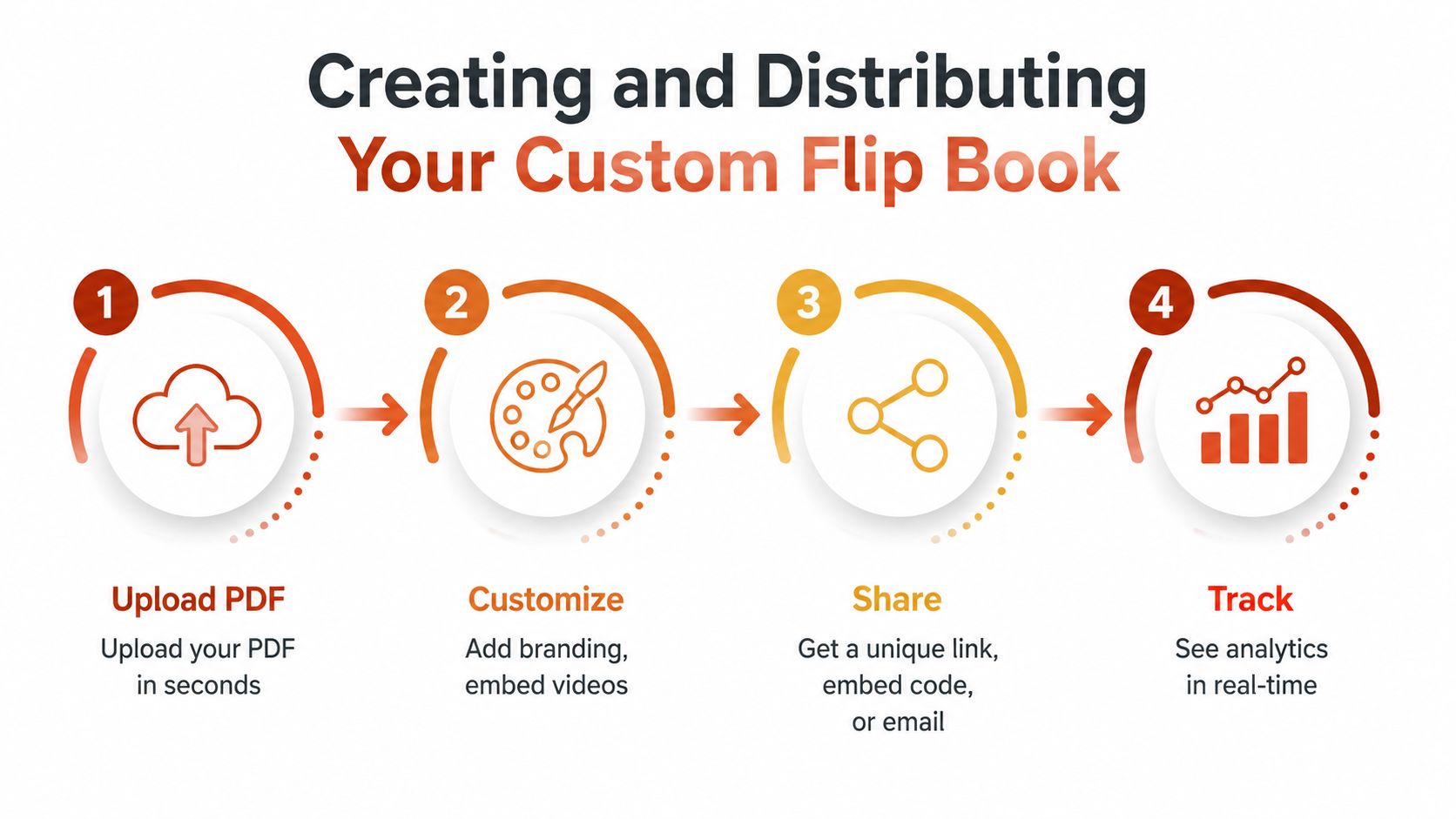
A PDF only becomes useful as a flip book if the delivery path is simple enough that people will open it. Upload the file, choose the viewer experience, and share a browser link. Readers do not need an account, and the sender does not need to build a separate delivery workflow just to get a tracked document in front of someone.
Start with the document you already have
A lot of teams overcomplicate this step. If the PDF is already approved, the job is usually to make distribution easier to use, not to rebuild the content from scratch. EveryPage also supports Word-to-PDF conversion and DocSend-to-PDF import, which helps when the source file still sits in a draft workflow or was built elsewhere.
Once the file is ready, distribution choices matter. Custom domains and vanity slugs make share links look intentional. QR codes help when the document needs to move from print or event materials into a browser. Embeds work well for websites, email invites, and distribution lists. Dynamic links keep the URL and QR code stable after file replacement, so the link can stay in place while the underlying document gets updated.
If you want a direct path from upload to shareable viewer, you can create and distribute your custom flip book at everypage.co/pdf-flipbook.
Add control without making sharing brittle
Security controls should stay optional, not get in the way of sharing. Password protection, watermarking, and link expiry are useful when the file is sensitive, but they should not force every sender into the same restricted pattern. Permanent links are just as valid when the document is meant to live as a durable asset.
For proofing work, comments and photo proofing keep feedback inside the document itself. For a brochure, lead capture forms can sit in front of the content without requiring the reader to install anything. The distribution path should match the document's job.
You can also use interactive hotspots, comments, embeds, folders, CSV export, Zapier, Make, the WordPress plugin, webhooks, Slack, and GA4 when the workflow needs to go beyond simple sharing. The useful pattern is to keep the first share fast, then add complexity only where the use case earns it.
Comparing Flip Book Platforms by Use Case
| Feature | EveryPage | DocSend | PandaDoc |
|---|---|---|---|
| Pricing shape | Flat per account, with Free, Basic at $9/mo, and Pro at $29/mo, with no per-user fees | Better suited to enterprise pricing structures | Better suited to contract and document workflow pricing |
| Reader account needed | No | Varies by setup | Varies by workflow |
| Privacy posture | Page-level analytics without storing IP addresses | Often used by teams that prioritise enterprise controls | Stronger fit where workflows centre on documents and signatures |
| Viewer modes | Standard, flipbook, swipe, magazine | Not the main focus | Not the main focus |
| Best fit | Sales proposals, investor decks, client proofs, gated content | Enterprise compliance teams | E-signatures and contract workflows |
| Limitation | No native e-signature functionality | May be more process-heavy than needed for simple sharing | Less focused on flipbook-style presentation |
EveryPage is the right fit when a team wants a shared document to stay light for readers, measurable for senders, and free of per-user pricing pressure. That makes it practical for proposals, investor materials, and proofing packs where the sender wants read visibility without asking the recipient to create an account.
DocSend is the stronger option for enterprise compliance teams that need more formal permission structures. PandaDoc is the better match for e-signature and contract workflows, especially when the document's end state is approval rather than viewing. EveryPage's clear limitation is that it doesn't provide native e-signature functionality, so if signing is the core requirement, another tool fits better.
Pricing comes up quickly in real buying conversations. EveryPage uses flat per-account pricing with Free, Basic at $9/mo, and Pro at $29/mo, and it doesn't charge per-user fees. That model is easier to justify for teams that share documents across sales, marketing, and client-facing roles without wanting each viewer or sender to become another seat.
When a Custom Flip Book Is the Right Choice
A custom flip book makes sense when a document has to show what happened after it was sent, not just whether it was delivered. That matters for a pitch deck that needs proof of engagement, a proposal where the sender wants a read-through signal, creative proofs that need comments on specific pages, or marketing content that should sit behind gated access.
It becomes a weaker choice when the document's main job is a legally binding action. Signing belongs in a workflow built for e-signatures, where approval steps and identity checks are part of the process. It is also unnecessary when internal circulation does not need tracking. In those cases, a standard PDF is often the cleaner option.
The practical test is straightforward. Match the viewer mode to the content, keep the sharing path low-friction, and use analytics where follow-up depends on behaviour. Custom flip books give senders page-level visibility that a plain attachment cannot, while also avoiding the common trap of using a more polished format that adds presentation value but no measurable insight.
See who reads your next PDF.
Try EveryPage free